November 9, 2026
Tapfiliate’s REST API integration lets you automate and manage affiliates, commissions, and conversions in real time from any platform.
✏️ In this article, we’ll discuss:
- What makes the REST API your best and all-purpose tool for tracking
- Requirements to install REST to Tapfiliate
- Core Setup steps
- Verifying your REST API integration
- Advanced use-cases that can be covered with the REST API
- A complete REST API library (Dev section)
Why REST API is the most flexible tracking solution😍
REST API ensures robust and adaptable integration between systems due to its unique aspects:- 🔒 Secure authorization (via the API key) - The system will only accept the authorized calls to the Tapfiliate API. Any attempts to create an action without a secret API key will fail, ensuring the safety of your setup.
- 🎨 Customizable requests (you can collect more data when tracking) - Unlike some of our pre-made integrations, the REST API is very flexible in terms of data that can be passed along with your API requests - whether it defines an alternate commission type, referrer information, or any additional data passed within the
meta_dataparameter. - 🥊 Ad-blockers resistant (accurate tracking) - REST API is a backend (server-side) integration, which means you don’t have to add any tracking script inside your website pages. Therefore, any ad-blocking software or extension will not affect the tracking process, as it only applies to the third-party tracking codes on the website.
- 💻 No need to install the tracking code — This factor makes the REST API an excellent fit for CMS-based websites where it’s not allowed to add custom code. It also makes it an excellent solution for connecting the applications (if your affiliate campaign is not website-oriented), so you can integrate the web/mobile app with Tapfiliate via API endpoints.
- ↕️ Avoids cross-domain limitations - Assuming you don’t need to rely on the tracking code, the REST API also helps cover the cases where your customer’s flow includes multiple instances located on different domains/systems, which is not natively possible within code-based integrations.
What do you need to set up the REST API tracking in Tapfiliate 🔧
To successfully integrate, ensure you have the following:-
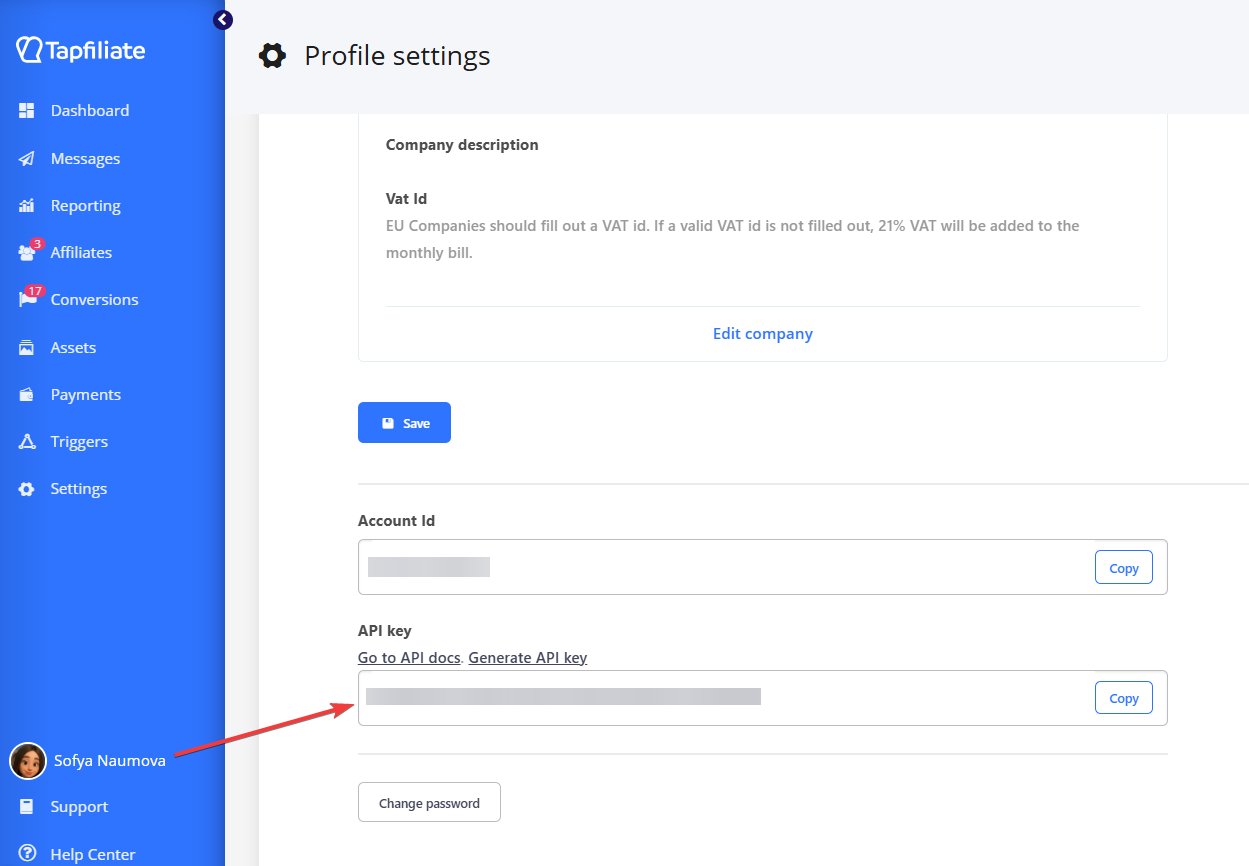
A live Tapfiliate account with access to your API key. Your API key is generated and stored at the bottom of your Profile Settings page:
- Admin/developer access to your server - required to process the API scenarios and send the data on tracking events from your side to the Tapfiliate server.
- A test affiliate added to your account ( 👉 here’s how you can create one).
The essential integration steps ⚙️
Step 1. Locate your affiliate referral link
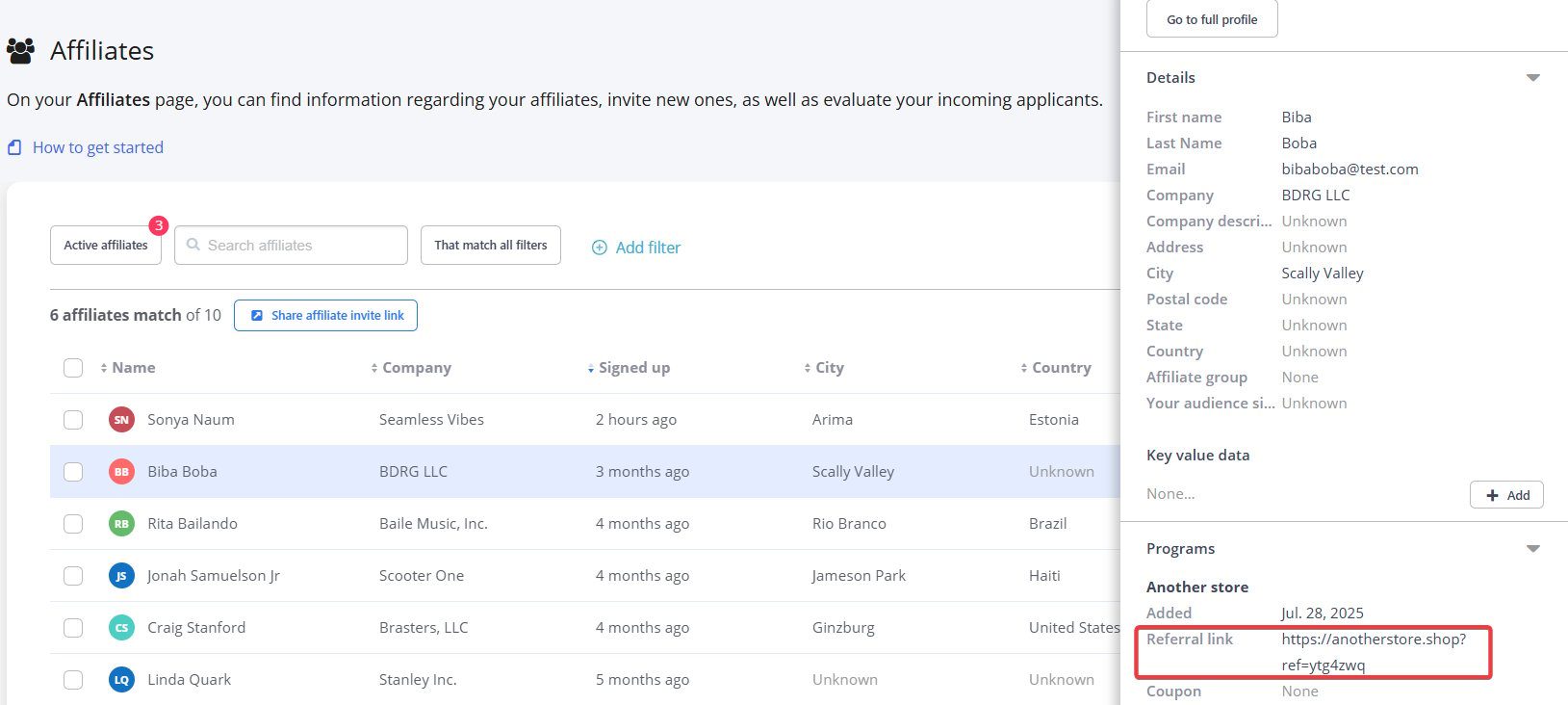
In your Affiliates overview, you can choose a test affiliate and copy their referral link. You will need the code that goes after?ref=abcdefg to attribute the further actions to a specific affiliate in the program.
Step 2. Create a click
Using your affiliate’s referral code, create a click via this API endpoint:click_id value - you can use it in subsequent steps when associating a particular click with a tracked customer/conversion.
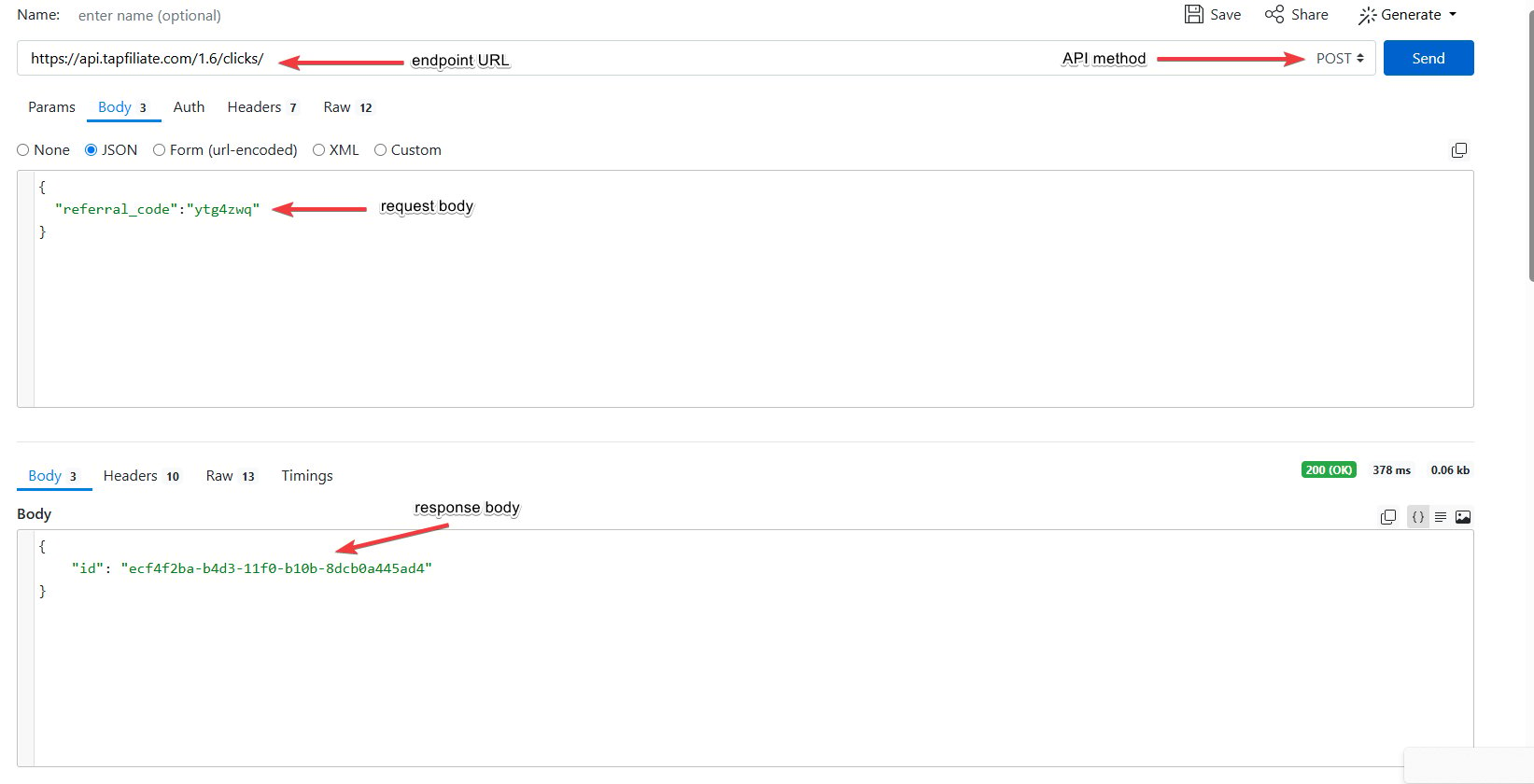
click_id value for further actions on your database end.
Step 3. Create a conversion
Now that you have a click_id that records the visitor’s data upon their access to the website/app, you can attach a conversion action via the REST API. Here is an endpoint to call:Attach and save more information within the conversion API call
-
referral_code (optional) - An affiliate’s referral code. This corresponds to the value of
ref=in their referral link. - tracking_id (optional) - Used if you are tracking a conversion with the help of a hybrid (REST API + JavaScript) integration.
- click_id (optional) - The value that was created within the click event. If you have attached any additional information to a click event, it will also be included in the conversion call response.
- coupon (optional) - An alternative parameter to track the conversion by (used in cases when you attribute conversions not by a referral code or a click_id, but via the affiliate coupon value).
- currency (optional) - The three-letter ISO currency code. Override the program’s default currency for this conversion by explicitly passing a currency code.
-
asset_id (optional) - Matching the
tap_aparameter, if you are using anonymized referral links. -
source_id (optional) - Matching the
tap_sparameter, if you are using anonymized referral links. - external_id (optional) - A unique identifier for this conversion. It can be anything meaningful to you, like an order number, user ID, or email address. After a conversion occurs, you can find this ID alongside the conversion on our platform. This makes it very easy to cross-reference data on our platform with your own database. This ID must be unique for each conversion.
- amount (optional) - The conversion amount
- customer_id (optional) - The ID for the current customer in your system. Depending on your program settings, this can be used for recurring / lifetime commissions.
- commission_type (optional) - If no commission type is supplied, the program’s default commission type is used.
-
commissions (optional) - Will override the
amountandcommission_typeparameters if set. - meta_data (optional) - Metadata for this transaction, used if you need to attach additional information to a conversion (such as product characteristics, category, quantity, etc.) that is not listed within the existing parameters above. Child Arguments
- user_agent (optional) - The client’s user agent string. Used for statistics and fraud detection.
- ip (optional) - The client’s IP address. Used for fraud detection and recording the information on the GEOs.
An example of the conversion API request
The API response example
Verify your REST API connection 👍
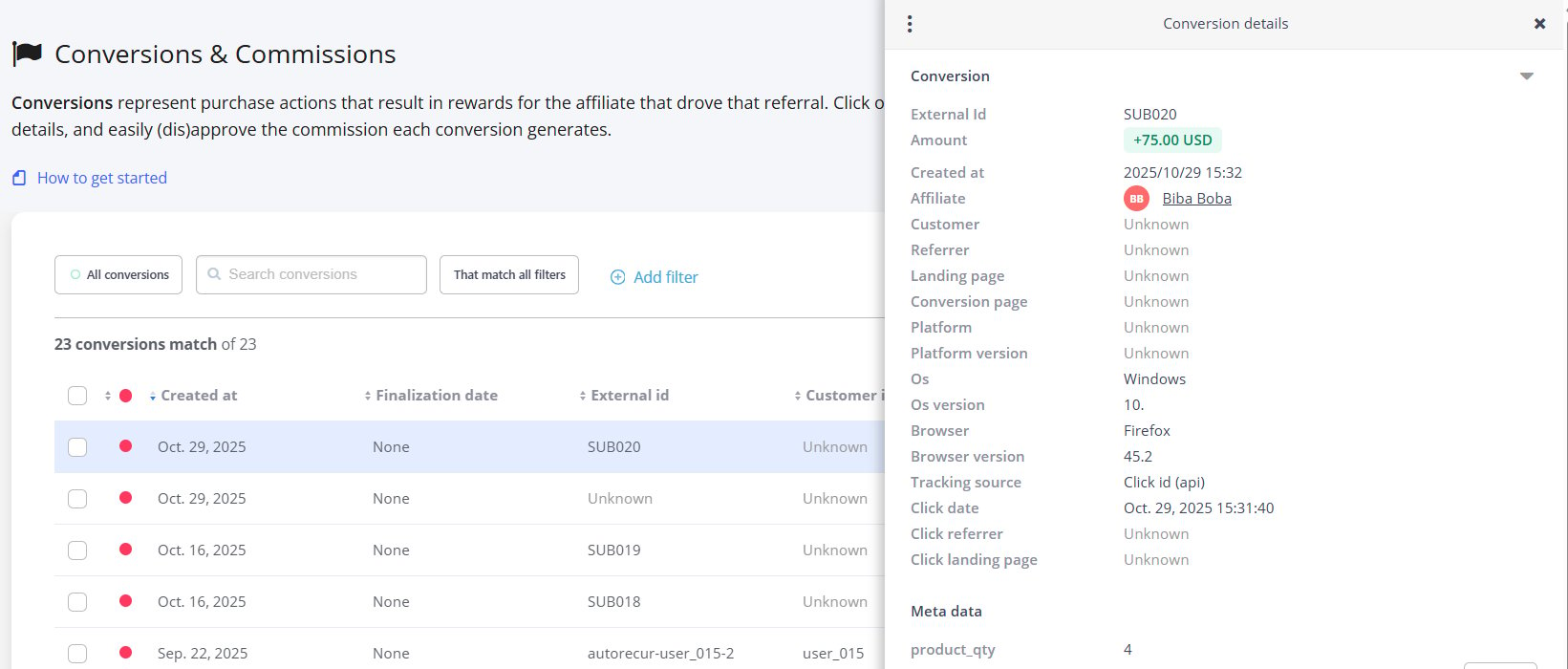
The REST API integration requires you to make a test purchase via an affiliate’s referral code. You can use it during testing and follow the Steps 1-3 we described above. If you’ll see the integration step marked as completed in the Getting Started Guide, and the conversion/click data populating in your Tapfiliate Reporting, you’re all set 🎊What else can be covered by the REST API (Advanced Use-Cases) 🆙
As highlighted above, the REST API supports a wide range of advanced tracking scenarios. Below, we will go over some of these.Tracking different commissions per product/different actions
When you need to assign a conversion with a different commission rate (for example, if this conversion represents a different in-platform action, a separate product, or a category), add the commission_type identifier to your API request when tracking the conversion. API endpoint URL:https://api.tapfiliate.com/1.6/conversions/
Request example:
Pass additional information with a conversion/customer data
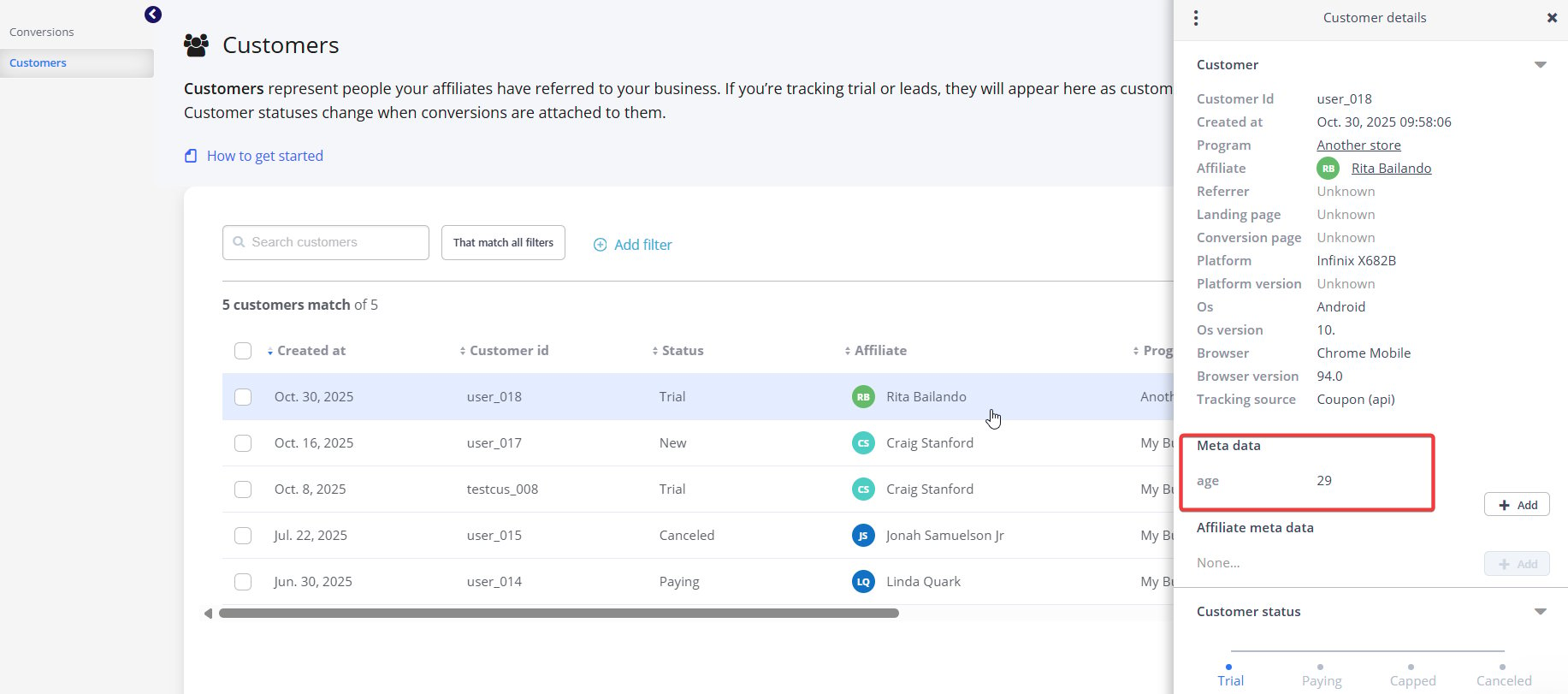
If you need to attach additional information to a conversion or a customer while tracking, the best solution is to include metadata in the conversion/customer creation call. You can also add metadata when tracking a click, and it will be included in the conversion metadata if a conversion is associated with this click. API endpoint URL:- For conversion metadata:
https://api.tapfiliate.com/1.6/conversions/ - For customer metadata:
https://api.tapfiliate.com/1.6/customers/ - For click metadata:
https://api.tapfiliate.com/1.6/clicks/
Request example:
"age": "29"},
Manage affiliate payouts
It’s possible to automate affiliate payments through Tapfiliate’s REST API as follows:- Get the outstanding balances via this endpoint:
https://api.tapfiliate.com/1.6/balances/(GET method) - Get the affiliate’s payout information: https://api.tapfiliate.com/1.6/affiliates/janejameson/payout-methods/
- Complete the payment with your preferred payment provider using its API.
- Create a new payment for the affiliate for the paid out amount using this endpoint:
https://api.tapfiliate.com/1.6/payments/ (POST method)
Complete REST API library 📚
Here, you will find all endpoints available in Tapfiliate’s REST API, grouped by the areas they affect and the actions they process.General 🌐
Authentication
You should authenticate your API request by adding your API key, asX-Api-Key along in the header of every request:
All of your API requests must be made over HTTPS. Plain HTTP calls will fail. API requests without authentication will also fail with a 403 error.
Pagination
Requests that return multiple items will be paginated to 25 items by default. You can specify further pages with the?page parameter.
?page parameter will return the first page.
The pagination info is included in the Link Header.
👉 If you need to view over 400 pages, you can use a special pagination parameter from the X-Pagination-Cursor header.
How it works:
- Make an initial API call to the required endpoint (for example, List all clicks: https://api.tapfiliate.com/1.6/clicks/)
- A successful API response will return the X-Pagination-Cursor: XXXXXXXXXXXXX (digital value).
- To view the next page, you can use the value you received in the next API call, as
https://api.tapfiliate.com/1.6/clicks/?searchFrom=XXXXXXXXXXXXX. - The API will return the new batch of clicks and a new X-Pagination-Cursor value.
- Using the new pagination value, you can repeat steps 2-4 as long as required to list all data.
Limits
Most endpoints have rate limits. Rate limits are communicated through the following headers:By account sections 📄
Clicks
- Create a click
- List all clicks (Enterprise endpoint)
- Get detailed information about the click (Enterprise endpoint)
Сreate a click
Method: POSTEndpoint URL:
https://api.tapfiliate.com/1.6/clicks/
Request example:
Response example:
Arguments you can add to the request:
- referral_code (required) - The affiliate’s referral code, obtained from the URL
- source_id (optional) -
aaaaaa(string, optional) - The source ID used by the affiliate (if any). Obtained from the URL. - meta_data (optional) - Any metadata parameters passed by the affiliate.
Child Arguments- key (required) - A key value pair. Multiple allowed types.
- referrer (optional) - The HTTP referrer. Will be used in reporting.
- landing_page (optional) - The current page. Will be used in reporting.
- user_agent (optional) - The whole user agent string for the client, which identifies their browser and device. Will be used in reporting.
- ip (optional) - The user’s IP address. Will be used in reporting.
List all clicks (Enterprise plan only)
Method: GETEndpoint URL:
https://api.tapfiliate.com/1.6/clicks/?program_id=my-business&affiliate_id=craigstanford&date_from=2025-01-01&date_to=2025-12-31
The request body will be empty, as all required parameters will be added to the request URL as query parameters.
URI parameters you can add to the request:
- program_id (optional) - Example: my-business. The program ID, located in your account’s Advanced settings.
- affiliate_id (optional) - Example: craigstanford. The affiliate’s ID in the API.
- date_from (optional) - Example: 2025-01-01. Date From, a day in UTC.
- date_to (optional) - Example: 2025-12-31. Date To, a day in UTC.
Response example
Get detailed information about the click (Enterprise plan only)
Method: GETEndpoint URL:
https://api.tapfiliate.com/1.6/clicks/ded3f4be-aa8e-11f0-8664-a90a6859c602/
URI parameters:
- id (required) - The ID of a click you want to get the info.
Response example:
Conversions
- Create a conversion
- Retrieve a conversion
- Update a conversion
- Delete a conversion
- List all conversions
- Add commissions to a conversion
- Retrieve metadata
- Update (replace) metadata
- Retrieve metadata by key
- Set metadata by key
- Delete metadata by key
Create a conversion
To create a conversion, you must provide one of the following parameters:referral code, customer_id, click_id, coupon, tracking_id, or a combination of asset_id and source_id.If multiple identifiers are included, the system will prioritize them in this order (highest to lowest): customer_id, coupon code, referral code, click ID, asset_id + source_id, and tracking ID. Method: POST
Endpoint URL:
https://api.tapfiliate.com/1.6/conversions/
URI parameters:
- override_max_cookie_time (optional) - A boolean value that defines whether your program’s cookie lifetime should be overridden when creating a conversion. If set to
False, a conversion will not be created outside the cookie lifetime; if set toTrue, a conversion will be recorded regardless of the cookie lifetime. Set toFalseby default.
Response example - see above.
Retrieve a conversion
Method: GETEndpoint URL:
https://api.tapfiliate.com/1.6/conversions/29877192/
URI parameters:
- conversion_id (required) - Example:
29877192. The numeric identifier of the conversion to apply the action to. Retrieved from the API, does not match the External ID in Tapfiliate.
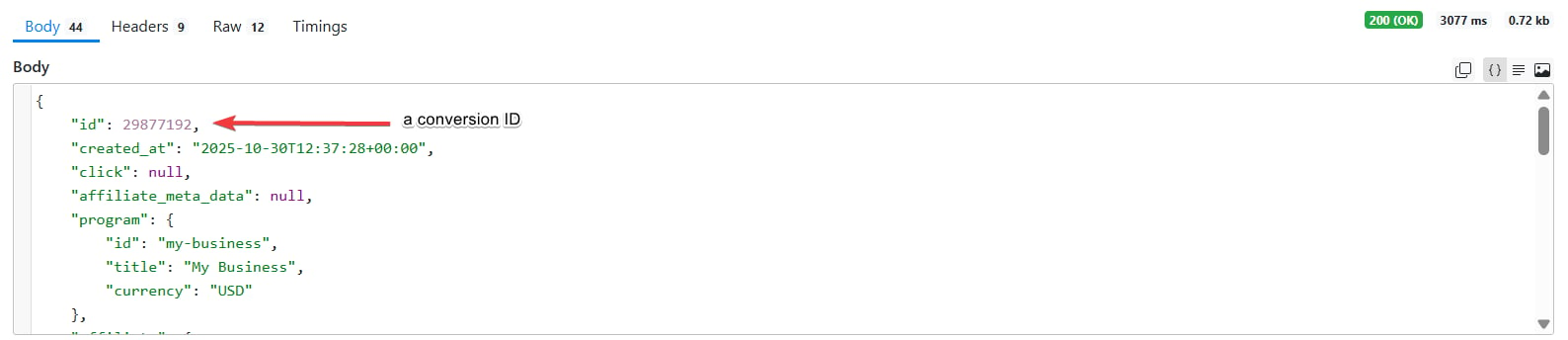
Response example:
Update a conversion
Method: PATCHEndpoint URL:
URI parameters:
- conversion_id (required) - Example: 1 The numeric identifier of the conversion to apply the action to. Retrieved from the API, does not match the External ID in Tapfiliate.
- recalculate_commissions (optional) - recalculates commissions when the Conversion amount changes.
Arguments for this API request:
- amount (optional) - The new commission amount, if you want to update it.
- external_id (optional) - A unique ID for this conversion. You can use any identifier that is meaningful to you, such as an order number, user ID, email address, etc. After the conversion occurs, this ID will be displayed alongside the conversion on our platform.
- meta_data (optional) - Metadata for this resource
Request example:
Response example:
Delete a conversion
Method: DELETEEndpoint URL:
https://api.tapfiliate.com/1.6/conversions/29877192/
URI parameters:
- conversion_id (required) - Example:
29877192. The numeric identifier of the conversion to apply the action to. Retrieved from the API, does not match the External ID in Tapfiliate.
204 code.
List all conversions
Method: GETEndpoint URL:
https://api.tapfiliate.com/1.6/conversions/?program_id=my-business&external_id=SUB019&affiliate_id=ritabailando&pending=true
URI parameters:
- program_id (optional) - Example: my-business. The program’s ID, located in the Advanced settings.
- external_id (optional) - Example: SUB019. This is the unique order/transaction ID from your system or shopping cart. This ID was passed when the conversions were first tracked.
- affiliate_id (optional) - Example: ritabailando. The affiliate ID.
- pending (optional) - Example: false. Defines whether the approved/disapproved commissions will be included in the response.
- date_from (optional) - Example: 2025-01-01. Date From, a day in UTC.
- date_to (optional) - Example: 2025-12-31. Date To, a day in UTC.
- use_profile_timezone (optional) - Deprecated, has no effect: dates in Tapfiliate are in UTC for every account.
Response example:
Add commissions to a conversion
Used when you want to attach additional commission to an existing conversion. Method: POSTEndpoint URL:
https://api.tapfiliate.com/1.6/conversions/28905353/commissions/
URI parameters:
- conversion_id (required) - Example:
28905353. The numeric identifier of the conversion to apply the action to. Retrieved from the API, do not match the External ID in Tapfiliate.
Arguments for the request:
- conversion_sub_amount (required) - The amount used to calculate the commission, according to the given or default commission type.
- commission_type (optional) - If no commission type is supplied, the programs default commission type is used
- comment (optional) - A comment for this commission. The comment will be visible to the affiliate - great way to explain the changes made.
Request example:
Response example:
Retrieve metadata
Method: GETEndpoint URL:
https://api.tapfiliate.com/1.6/conversions/28905353/meta-data/
URI parameters:
- conversion_id (required) - Example:
29877192. The numeric identifier of the conversion to apply the action to. Retrieved from the API, does not match the External ID in Tapfiliate.
Response example:
Update (replace) metadata
Method: PUTEndpoint URL:
https://api.tapfiliate.com/1.6/conversions/28905353/meta-data/
URI parameters:
- conversion_id (required) - Example:
29877192. The numeric identifier of the conversion to apply the action to. Retrieved from the API, does not match the External ID in Tapfiliate.
Arguments for the request body:
- metadata - You will require a key and the value, for example “product”: “Sample Item Option 73”.
Request example:
Retrieve metadata by key
Method: GETEndpoint URL:
https://api.tapfiliate.com/1.6/conversions/28905353/meta-data/product_qty/
URI parameters:
- conversion_id (required) - Example:
29877192. The numeric identifier of the conversion to apply the action to. Retrieved from the API, does not match the External ID in Tapfiliate. - key (required) - the metadata key. This key will sort the information in the API response.
Response example:
Set metadata by key
Method: PUTEndpoint URL:
https://api.tapfiliate.com/1.6/conversions/28905353/meta-data/product_qty/
URI parameters:
- conversion_id (required) - Example:
29877192. The numeric identifier of the conversion to apply the action to. Retrieved from the API, does not match the External ID in Tapfiliate. - key (required) - the metadata key. This key will sort the information in the API response.
Request example:
Response example:
Delete metadata by key
Method: DELETEEndpoint URL:
https://api.tapfiliate.com/1.6/conversions/28905353/meta-data/product_qty/
URI parameters:
- conversion_id (required) - Example:
29877192. The numeric identifier of the conversion to apply the action to. Retrieved from the API, does not match the External ID in Tapfiliate. - key (required) - the metadata key. This key will sort the information in the API response.
204 code.
Commissions
- Retrieve a commission
- Update a commission
- List all commissions
- Approve a commission
- Disapprove a commission
Retrieve a commission
Method: GETEndpoint URL:
https://api.tapfiliate.com/1.6/commissions/38080490/
URI parameters:
- commission_id (required) - Example:
38080490. The numeric identifier of the commission to fetch. Retrieved from the API.
Response example:
Update a commission
Method: PATCHEndpoint URL:
https://api.tapfiliate.com/1.6/commissions/38080490/
URI parameters:
- commission_id (required) - Example:
38080490. The numeric identifier of the commission to fetch. Retrieved from the API.
Arguments to use:
- amount (optional) - The new commission amount.
- comment (optional) - A comment for this commission. The comment will be visible to the affiliate.
- approved (optional) - A boolean value (set to true/false) to approve or disapprove commission.
- conversion_sub_amount (optional) - The new value for the conversion (will be recalculated).
Request example:
Response example:
List all commissions
Method: GETEndpoint URL:
https://api.tapfiliate.com/1.6/commissions/?affiliate_id=craigstanford&status=approved&paid=0
URI parameters:
- affiliate_id (optional) - Example: craigstanford. The affiliate ID.
- status (optional) - Example: approved. An optional approval status to filter by. Valid values are:
approved|disapproved|pending. - paid (optional) - Example: 0. Only shows commissions that are paid out. Valid values are:
1and0.
Response example:
Approve a commission
Method: PUTEndpoint URL:
https://api.tapfiliate.com/1.6/commissions/38080490/approved/
URI parameters:
- commission_id (required) - Example:
38080490. The numeric identifier of the commission to fetch. Retrieved from the API.
Response example:
Disapprove a commission
Method: DELETEEndpoint URL:
https://api.tapfiliate.com/1.6/commissions/38080490/approved/
URI parameters:
- commission_id (required) - Example:
38080490. The numeric identifier of the commission to fetch. Retrieved from the API.
Response example:
Customers
- Create a customer
- Retrieve a customer
- Update a customer
- List all customers
- Cancel a customer
- Uncancel a customer
- Retrieve metadata
- Update (replace) metadata
- Retrieve metadata by key
- Set metadata by key
- Delete metadata by key
- Delete customer
Create a customer
You must provide one of the following identifiers: tracking ID, referral code, click ID, coupon code, or an asset_id and source_id pair.If multiple identifiers are submitted, they will be prioritized in this order (highest to lowest): coupon code, referral code, click ID, asset_id + source_id, tracking ID. Method: POST
Endpoint URL:
URI parameters:
- override_max_cookie_time (optional) - A boolean value that defines whether your program’s cookie lifetime should be overridden when creating a conversion. If set to
False, a conversion will not be created outside the cookie lifetime; if set toTrue, a conversion will be recorded regardless of the cookie lifetime. Set toFalseby default.
Arguments for the request:
- referral_code (optional) - An affiliate’s referral code. This corresponds to the value of
ref=in their referral link. - tracking_id (optional) - Used if you are tracking a conversion with the help of a hybrid (REST API + JavaScript) integration.
- click_id (optional) - The value that was created within the click event. If you have attached any additional information to a click event, it will also be included in the customer call response.
- coupon (optional) - An alternative parameter to track the conversion by (used in cases when you attribute conversions not by a referral code or a click_id, but via the affiliate coupon value).
- asset_id (optional) - Matching the
tap_aparameter, if you are using anonymized referral links. - source_id (optional) - Matching the
tap_sparameter, if you are using anonymized referral links. - customer_id (optional) - The ID for the current customer in your system. Depending on your program settings, this can be used for recurring / lifetime commissions. This ID must be unique for each customer.
- meta_data (optional) - Metadata for this customer record, used if you need to attach additional information to customer details that is not listed within the existing parameters above.
- status (optional) - Sets the customer’s initial status. You can read more about statuses here. Defaults to “new” if none is passed.
- user_agent (optional) - The client’s user agent string. Used for statistics and fraud detection.
- ip (optional) - The client’s IP address. Used for fraud detection and recording the information on the GEOs.
Request example:
Response example:
Retrieve a customer
Method: GETEndpoint URL:
https://api.tapfiliate.com/1.6/customers/cu_-cesNVckkOqi2jTgSH/
URI parameters:
-
id (required) - The Tapfiliate-generated
idof the Customer to act with. Does not match the Customer_ID in your program. You can find it when creating a customer via the REST API: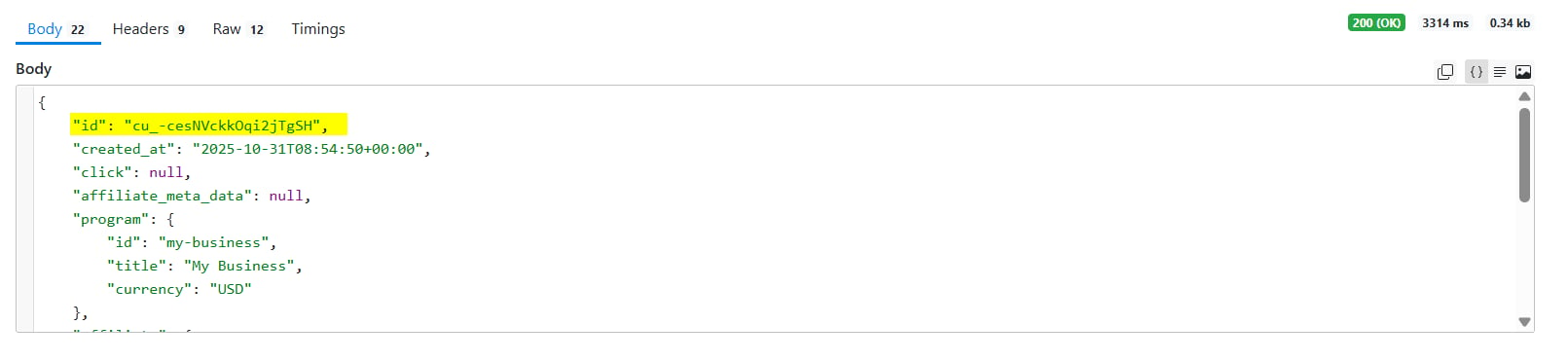
Response example:
Update a customer
This method allows you to attach metadata to the customer record and update the Tapfiliate Customer_ID. Method: PATCHEndpoint URL:
https://api.tapfiliate.com/1.6/customers/cu_-cesNVckkOqi2jTgSH/
URI parameters:
- id (required) - The Tapfiliate-generated
idof the Customer to act with. Does not match the Customer_ID in your program. You can find it when creating a customer via the REST API.
Arguments:
- customer_id (optional) - The ID for the current customer in your system. Depending on your program settings, this can be used for recurring / lifetime commissions. This ID must be unique for each customer.
- meta_data (optional) - Metadata for this customer record, used if you need to attach additional information to customer details that is not listed within the existing parameters above.
Request example:
Response example:
List all customers
Method: GETEndpoint URL:
https://api.tapfiliate.com/1.6/customers/?program_id=my-business&affiliate_id=craigstanford
URI parameters:
- program_id (optional) - Example: my-business. The program’s ID, located in the Advanced settings.
- customer_id (optional) - The ID for the current customer in your system. Depending on your program settings, this can be used for recurring / lifetime commissions. This ID must be unique for each customer.
- affiliate_id (optional) - Example: craigstanford. The affiliate ID.
- date_from (optional) - Example: 2025-01-01. Date From.
- date_to (optional) - Example: 2025-12-31. Date To.
Response example:
Cancel a customer
Method: DELETEEndpoint URL:
https://api.tapfiliate.com/1.6/customers/cu_-cesNVckkOqi2jTgSH/status/
The request body will be empty, as all required data will be added to the request URL as query parameters.
Response example:
Uncancel a customer
This method restores a customer’s status in the program to its previous value. Method: DELETEEndpoint URL:
https://api.tapfiliate.com/1.6/customers/cu_-cesNVckkOqi2jTgSH/status/
The request body will be empty, as all required data will be added to the request URL as query parameters.
Response example:
Retrieve metadata
Method: GETEndpoint URL:
https://api.tapfiliate.com/1.6/customers/cu_-cesNVckkOqi2jTgSH/meta-data/
URI parameters:
- id (required) - The Tapfiliate-generated
idof the Customer to act with. Does not match the Customer_ID in your program. You can find it when creating a customer via the REST API.
Response example:
Update (replace) metadata
Method: PUTEndpoint URL:
https://api.tapfiliate.com/1.6/customers/cu_-cesNVckkOqi2jTgSH/meta-data/
URI parameters:
- id (required) - The Tapfiliate-generated
idof the Customer to act with. Does not match the Customer_ID in your program. You can find it when creating a customer via the REST API.
Request example:
Retrieve metadata by key
Method: GETEndpoint URL:
https://api.tapfiliate.com/1.6/customers/cu_-cesNVckkOqi2jTgSH/meta-data/age/
URI parameters:
- id (required) - The Tapfiliate-generated
idof the Customer to act with. Does not match the Customer_ID in your program. You can find it when creating a customer via the REST API. - key (required) - The metadata
key.
Response example:
Set metadata by key
Method: PUTEndpoint URL:
https://api.tapfiliate.com/1.6/customers/cu_-cesNVckkOqi2jTgSH/meta-data/segment/
URI parameters:
- id (required) - The Tapfiliate-generated
idof the Customer to act with. Does not match the Customer_ID in your program. You can find it when creating a customer via the REST API. - key (required) - Example: segment.The metadata
key.
Request example:
Response example:
Delete metadata by key
Method: DELETEEndpoint URL:
https://api.tapfiliate.com/1.6/customers/cu_-cesNVckkOqi2jTgSH/meta-data/segment/
URI parameters:
- id (required) - The Tapfiliate-generated
idof the Customer to act with. Does not match the Customer_ID in your program. You can find it when creating a customer via the REST API. - key (required) - Example: segment.The metadata
key.
204 code.
Delete customer
Method: DELETEEndpoint URL:
https://api.tapfiliate.com/1.6/customers/cu_-cesNVckkOqi2jTgSH/
URI parameters:
- id (required) - The Tapfiliate-generated
idof the Customer to act with. Does not match the Customer_ID in your program. You can find it when creating a customer via the REST API.
204 code.
Programs
- Retrieve a program
- List all programs
- List all affiliates in a program
- Add an affiliate to a program
- Retrieve an affiliate in a program
- Update an affiliate in a program
- Approve an affiliate in a program
- Disapprove an affiliate in a program
- List program commission types
- List program MLM levels
- List program bonuses
Retrieve a program
Method: GETEndpoint URL:
https://api.tapfiliate.com/1.6/programs/my-business/
URI parameters:
- program_id (required) - Example: my-business. The program ID, located in your account’s Advanced settings.
Response example:
List all programs
Method: GETEndpoint URL:
https://api.tapfiliate.com/1.6/programs/?asset_id=1-aaaaaa
URI parameters:
- asset_id (optional) - Matching the
tap_aparameter, if you are using anonymized referral links.
Response example:
List all affiliates in a program
Method: GETEndpoint URL:
URI parameters:
- program_id (required) - Example: my-business. The program ID, located in your account’s Advanced settings.
- source_id (optional) - Example: 8901698-f2cc9f. An affiliate’s source id.
- email (optional) - Example: jane@example-blog.inc. An affiliate’s email address.
- parent_id (optional) - Example: craigstanford. Retrieves child affiliates (MLM downline) for a particular parent affiliate.
- affiliate_group_id (optional) - Example: ag_eXampl3. Retrieves affiliates for a particular affiliate group.
Response example:
Add an affiliate to a program
Method: POSTEndpoint URL:
https://api.tapfiliate.com/1.6/programs/another-store/affiliates/
URI parameters:
- program_id (required) - Example: another-store. The program ID, located in your account’s Advanced settings.
- send_welcome_email (optional) - Set to
True/Falseor1/0. Ensures an added affiliate receives a welcome email.
Arguments for this API request:
- affiliate (required)
- [Child argument] id (required) - An affiliate’s ID.
- approved (optional) - A boolean value that defines an affiliate’s status in the program.
Truesets their status to Approved,Falseto Disapproved, andNullto Pending. - coupon (optional) - An affiliate’s coupon code for this program (if any is assigned).
Request example:
Response example:
Retrieve an affiliate in a program
Method: GETEndpoint URL:
https://api.tapfiliate.com/1.6/programs/another-store/affiliates/sonyanaum/
URI parameters:
- program_id (required) - Example: another-store. The program ID, located in your account’s Advanced settings.
- affiliate_id (optional) - Example: sonyanaum. The affiliate’s ID in the API.
Response example:
Update an affiliate in a program
Method: PATCHEndpoint URL:
https://api.tapfiliate.com/1.6/programs/another-store/affiliates/sonyanaum/
URI parameters:
- program_id (required) - Example: another-store. The program ID, located in your account’s Advanced settings.
- affiliate_id (optional) - Example: sonyanaum. The affiliate’s ID in the API.
Arguments for the request:
- coupon (required) - An affiliate’s coupon code for this program.
Request example:
Response example:
Approve an affiliate in a program
Method: PUTEndpoint URL:
https://api.tapfiliate.com/1.6/programs/another-store/affiliates/sonyanaum/approved
URI parameters:
- program_id (required) - Example: another-store. The program ID, located in your account’s Advanced settings.
- affiliate_id (optional) - Example: sonyanaum. The affiliate’s ID in the API.
Response example:
Disapprove an affiliate in a program
Method: DELETEEndpoint URL:
https://api.tapfiliate.com/1.6/programs/another-store/affiliates/sonyanaum/approved
URI parameters:
- program_id (required) - Example: another-store. The program ID, located in your account’s Advanced settings.
- affiliate_id (optional) - Example: sonyanaum. The affiliate’s ID in the API.
Response example:
List program commission types
Method: GETEndpoint URL:
https://api.tapfiliate.com/1.6/programs/my-business/commission-types/
URI parameters:
- program_id (required) - Example: my-business. The program ID, located in your account’s Advanced settings.
Response example:
List program MLM levels
Method: GETEndpoint URL:
https://api.tapfiliate.com/1.6/programs/my-business/levels/
URI parameters:
- program_id (required) - Example: my-business. The program ID, located in your account’s Advanced settings.
Response example:
List program bonuses
Method: GETEndpoint URL:
https://api.tapfiliate.com/1.6/programs/my-business/bonuses/
URI parameters:
- program_id (required) - Example: my-business. The program ID, located in your account’s Advanced settings.
Response example:
Payments
List all balances
This endpoint creates a list of affiliates’ current balances in your Tapfiliate account. Method: GETEndpoint URL:
https://api.tapfiliate.com/1.6/balances/
The request body will be empty, as all necessary data will be included in the request URL as query parameters.
Response example:
List all payments
Method: GETEndpoint URL:
https://api.tapfiliate.com/1.6/payments
The request body will be empty, as all necessary data will be included in the request URL as query parameters.
Response example:
Retrieve a payment
Method: GETEndpoint URL:
https://api.tapfiliate.com/1.6/payments/pa_uPf_7LmUe2gommWYbA/
URI parameters:
- id (required) - Example: pa_uPf_7LmUe2gommWYbA. The ID of the current payment.
Response example:
Create a payment
Method: POSTEndpoint:
https://api.tapfiliate.com/1.6/payments/
Request example:
Response example:
Cancel a payment
Method: DELETEEndpoint URL:
https://api.tapfiliate.com/1.6/payments/pa_AeKrm0KUyLh09cOVCl
URI parameters:
- id (required) - Example: pa_AeKrm0KUyLh09cOVCl. The ID of the current payment.
204 code.
Affiliates
- Create an affiliate
- Retrieve an affiliate
- Delete an affiliate
- List all affiliates
- Set affiliate group
- Remove the affiliate from a group
- Create a note for an affiliate
- Update note
- List notes
- Delete note
- Set affiliate metadata by key
- Retrieve metadata by key
- Delete metadata by key
- Retrieve metadata
- Update (replace) metadata
- Set the affiliate payout method
- Get the affiliate’s payout method
- List the affiliate’s payout methods
- Retrieve an affiliate’s balance
- List an affiliate’s payments
- Set a parent to an affiliate
- Remove parent affiliate
- Get affiliations
- Get affiliate’s custom fields
Create an affiliate
At this point, theaffiliate id will be created. As long as an affiliate is created, but not yet part of any program, they will be archived. To add an affiliate to a program, please use the respective endpoint.
Method: POSTEndpoint URL:
https://api.tapfiliate.com/1.6/affiliates/
Arguments for this API request:
- firstname (required) - The affiliate’s first name.
- lastname (required) - The affiliate’s last name.
- email (required) - The affiliate’s email address.
- password (optional) - Password for the new affiliate. If not provided, a password is automatically generated and returned in the response.
- company (optional) - Company information for the affiliate.
Child fields:- name (optional) - Company name
- address (optional) - Affiliate’s address details
Child fields:- address (required) - Street address
- postal_code (required) - Postal / ZIP code
- city (required) - City
- state (optional) - State/region
- country (required) - Country details
Child fields:- code (required) - ISO-3166-1 country code (e.g., “US”, “NL”)
- custom_fields (optional) - Key/value pairs for custom affiliate fields.
Request example:
Response example:
Retrieve an affiliate
Method: GETEndpoint URL:
https://api.tapfiliate.com/1.6/affiliates/rustygoodson/
URI parameters:
- affiliate_id (required) - Example: rustygoodson. The affiliate ID.
Response example:
Delete an affiliate
Method: DELETEEndpoint URL:
https://api.tapfiliate.com/1.6/affiliates/rustygoodson/
URI parameters:
- affiliate_id (required) - Example: rustygoodson. The affiliate ID.
204 code.
List all affiliates
This endpoint returns all affiliates that match the parameters specified in the request URL. Method: GETEndpoint URL:
https://api.tapfiliate.com/1.6/affiliates/?referral_code=mmu0zdy&parent_id=lindaquark/
URI parameters:
- click_id (optional) - The value that was created within the click event and stores the visitor’s data.
- email (optional) - An affiliate’s email address.
- source_id (optional) - Matching the
tap_sparameter, if you are using anonymized referral links. - referral_code (optional) - Example: mmu0zdy. An affiliate’s referral code. This corresponds to the value of
ref=in their referral link. - parent_id (optional) - Example: lindaquark. Retrieves child affiliates for a certain parent affiliate.
- affiliate_group_id (optional) - Example: ag_77WCDy90IMs8m-sXpo. Retrieves affiliates for a particular affiliate group.
Response example:
Set affiliate group
Method: PUTEndpoint URL:
https://api.tapfiliate.com/1.6/affiliates/rustygoodson/group/
URI parameters:
- affiliate_id (required) - Example: rustygoodson. The affiliate ID.
Arguments:
- group_id (required) - The identifier of an affiliate group, can be found in your Programs > Affiliate Groups section.
Request example:
Response example:
Remove the affiliate from a group
Unassigns an affiliate from a group in your Tapfiliate program. Method: DELETEEndpoint URL:
https://api.tapfiliate.com/1.6/affiliates/rustygoodson/group/
URI parameters:
- affiliate_id (required) - Example: rustygoodson. The affiliate ID.
204 code.
Create a note for an affiliate
Method: POSTEndpoint URL:
https://api.tapfiliate.com/1.6/affiliates/rustygoodson/notes/
URI parameters:
-
affiliate_id (required) - Example: rustygoodson. The affiliate ID.
Arguments for the request:
- message (required) - A note to add to an affiliate profile.
Request example:
Response example:
Update note
Method: PUTEndpoint URL:
https://api.tapfiliate.com/1.6/affiliates/rustygoodson/notes/49225/
URI parameters:
- affiliate_id (required) - Example: rustygoodson. The affiliate ID.
- id (required) - A note ID.
Arguments for the request:
- message (required) - A note to add to an affiliate profile.
Request example:
Response example:
List notes
Method: GETEndpoint URL:
https://api.tapfiliate.com/1.6/affiliates/rustygoodson/notes/
URI parameters:
- affiliate_id (required) - Example: rustygoodson. The affiliate ID.
Response example:
Delete note
Method: DELETEEndpoint URL:
https://api.tapfiliate.com/1.6/affiliates/rustygoodson/notes/49225/
URI parameters:
- affiliate_id (required) - Example: rustygoodson. The affiliate ID.
- id (required) - A note ID.
204 code.
Set affiliate metadata by key
Method: PUTEndpoint URL:
https://api.tapfiliate.com/1.6/affiliates/rustygoodson/meta-data/traffic_source/
URI parameters:
- affiliate_id (required) - Example: rustygoodson. The affiliate ID.
- key (required) - the metadata key. This key will sort the information in the API response.
Request example:
Response example:
Retrieve metadata by key
Method: GETEndpoint URL:
https://api.tapfiliate.com/1.6/affiliates/rustygoodson/meta-data/traffic_source/
URI parameters:
- affiliate_id (required) - Example: rustygoodson. The affiliate ID.
- key (required) - the metadata key. This key will sort the information in the API response.
Response example:
Delete metadata by key
Method: DELETEEndpoint URL:
https://api.tapfiliate.com/1.6/affiliates/rustygoodson/meta-data/traffic_source/
URI parameters:
- affiliate_id (required) - Example: rustygoodson. The affiliate ID.
- key (required) - the metadata key.
204 code.
Retrieve metadata
Method: GETEndpoint URL:
https://api.tapfiliate.com/1.6/affiliates/jonahsamuelsonjr/meta-data/
URI parameters:
- affiliate_id (required) - Example: jonahsamuelsonjr. The affiliate ID.
Response example:
Update (replace) metadata
Method: PUTEndpoint URL:
https://api.tapfiliate.com/1.6/affiliates/jonahsamuelsonjr/meta-data/
URI parameters:
- affiliate_id (required) - Example: jonahsamuelsonjr. The affiliate ID.
Arguments for this request:
- metadata (required) - You will have to add a key and a value for this metadata object.
Request example:
Response example:
Set the affiliate payout method
Method: PUTEndpoint URL:
https://api.tapfiliate.com/1.6/affiliates/ritabailando/payout-methods/paypal/
URI parameters:
- affiliate_id (required) - Example: ritabailando. The affiliate ID.
- payout_method_id (required) - The identifier of the payment method.
Arguments for this API request:
- payout method type (required) - Added based on the payout method. Example: for PayPal, you’ll need the
paypal_addressparameter.
Request example:
Response example:
Get the affiliate’s payout method
Method: GETEndpoint URL:
https://api.tapfiliate.com/1.6/affiliates/ritabailando/payout-methods/paypal/
URI parameters:
- affiliate_id (required) - Example: ritabailando. The affiliate ID.
- payout_method_id (required) - The identifier of the payment method.
Response example:
List the affiliate’s payout methods
Method: GETEndpoint URL:
https://api.tapfiliate.com/1.6/affiliates/ritabailando/payout-methods/
URI parameters:
- affiliate_id (required) - Example: ritabailando. The affiliate ID.
Response example:
Retrieve an affiliate’s balance
Method: GETEndpoint URL:
https://api.tapfiliate.com/1.6/affiliates/ritabailando/balances/
URI parameters:
- affiliate_id (required) - Example: ritabailando. The affiliate ID.
Response example:
List an affiliate’s payments
Method: GETEndpoint URL:
https://api.tapfiliate.com/1.6/affiliates/ritabailando/payments/
URI parameters:
- affiliate_id (required) - Example: ritabailando. The affiliate ID.
Response example:
Set a parent to an affiliate
Method: POSTEndpoint URL:
https://api.tapfiliate.com/1.6/affiliates/sonyanaum/parent/
URI parameters:
- child_affiliate_id (required) - Example: sonyanaum. The affiliate ID.
Arguments for this API request:
- affiliate_id (optional) - The affiliate
idof the parent affiliate.
Request example:
Response example:
Remove parent affiliate
Method: DELETEEndpoint URL:
https://api.tapfiliate.com/1.6/affiliates/sonyanaum/parent/
URI parameters:
- child_affiliate_id (required) - Example: sonyanaum. The affiliate ID.
204 code.
Get affiliations
This endpoint retrieves a list of programs to which a given affiliate is (or has been) affiliated. Method: GETEndpoint URL:
https://api.tapfiliate.com/1.6/affiliates/lindaquark/programs/
URI parameters:
- affiliate_id (required) - Example: lindaquark. The affiliate ID.
Response example:
Get affiliates’ custom fields
Method: GETEndpoint URL:
https://api.tapfiliate.com/1.6/affiliates/custom-fields/
The API request body will be empty, as no URI parameters or arguments are required for this endpoint.
Response example:
Affiliate Groups
Create a new affiliate group
Method: POSTEndpoint URL:
https://api.tapfiliate.com/1.6/affiliate-groups/
Arguments:
- title (required) - A name for your new affiliate group.
Request example:
Response example:
List all affiliate groups
Method: GETEndpoint URL:
https://api.tapfiliate.com/1.6/affiliate-groups/ The request body will be empty, as all required parameters will be added to the request URL as query parameters.
Response example:[{
Update an affiliate group
Allows changing the group title. Method: PATCHEndpoint URL:
https://api.tapfiliate.com/1.6/affiliate-groups/ag_8jxwhHQEXOm_fgJPoK/
URI parameters:
- affiliate_group_id (optional) - Example: ag_8jxwhHQEXOm_fgJPoK. Retrieves affiliates for a specific affiliate group.
Arguments for this API request:
- title (required) - The new name of an affiliate group.
Request example:
Response example:
Affiliate Prospects
- Create an affiliate prospect
- Retrieve an affiliate prospect
- List all affiliate prospects
- Delete an affiliate prospect
Create an affiliate prospect
Method: POSTEndpoint URL:
https://api.tapfiliate.com/1.6/affiliate-prospects/
Arguments for this API call:
- firstname (required) - The affiliate prospect’s first name.
- lastname (required) - The affiliate prospect’s last name.
- email (optional) - The affiliate’s email address.
- company (optional) - The affiliate prospect’s company data.
- name (optional) - Company name.
- address (optional) - The affiliate prospect’s address.
- address (required) - Street address.
- postal_code (required) - Postal/ZIP code.
- city (required) - City.
- state (optional) - State/region (e.g., Holland).
- country (required) - Country details.
- code (required) - ISO-3166-1 country code (e.g., “US”, “NL”).
- program_id (optional) - The program to add the affiliate prospect to; if none is provided, the prospect is added to the default program.
- affiliate_group_id (optional) - The affiliate group to assign the affiliate prospect to.
Request example:
Response example:
Retrieve an affiliate prospect
Method: GETEndpoint URL:
https://api.tapfiliate.com/1.6/affiliate-prospects/peterlaneil/
URI parameters:
- affiliate_prospect_id (required) - An identifier of an affiliate prospect.
Response example:
List all affiliate prospects
Method: GETEndpoint URL:
https://api.tapfiliate.com/1.6/affiliate-prospects/?email=peter@example.com&referral_code=mgnmztr&program_id=my-business
URI parameters:
- email (optional) - Example: peter@example.com. An email address of an affiliate prospect.
- referral_code (optional) - Example: mgnmztr. An affiliate prospect’s referral code. This corresponds to the value of
ref=in their referral link. - program_id (optional) - Example: my-business. Retrieves affiliate prospects for a particular program.
- group_id (optional) - Retrieves affiliate prospects for a certain affiliate group.
Response example:
Delete an affiliate prospect
Method: DELETEEndpoint URL:
https://api.tapfiliate.com/1.6/affiliate-prospects/peterlaneil/
URI parameters:
- affiliate_prospect_id (required) - An identifier of an affiliate prospect.
204 code.
Still need help?
If you have any questions or if something in this guide is unclear, please don’t hesitate to contact us at support@tapfiliate.com—we’re happy to assist!