January 22, 2026
Setting up the CNAME (Canonical Name) record is essential to ensure your custom domain name functions properly in Tapfiliate.
In this article, we will discuss:
Below, we’ve outlined the steps to set up your custom domain.
- First, log in to your hosting provider and edit the DNS settings for the domain name you chose for Tapfiliate.
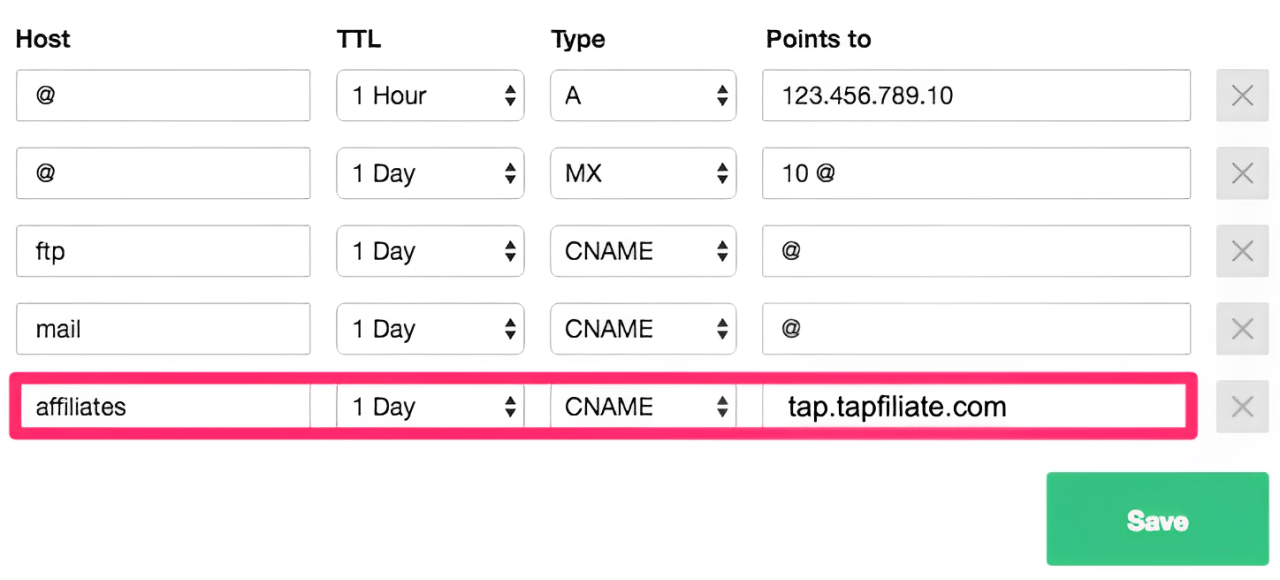
- Create a new
CNAMErecord with the word “affiliates”, “partners,” or something else of your choice. - Point that record to the affiliate portal domain you have set up in your Branding settings page, when you opened your Tapfiliate account (e.g.
tap.tapfiliate.com). - Save your DNS settings.
- Next, in Tapfiliate, go to your Settings > Branding options page. Add your new custom domain (e.g.
affiliates.yourcompany.com) and save.
- Tapfiliate automatically purchases an SSL certificate for your custom domain and installs it on our end. This is included with the Scale and Enterprise plans.
- It can take up to 24 hours before the new CNAME can be accessed - so don’t worry if your new subdomain isn’t live straight away!
- If you plan on adding the Facebook-shareable assets to your program, we recommend configuring the Facebook app ID alongside setting up the CNAME record.