October 15, 2026
This guide provides instructions on launching your affiliate marketing program for your subscription solution powered by Memberful. It offers guidance for two different setup scenarios:
-
For Memberful Users with WordPress:
-
For Memberful Users without WordPress:
To activate your integration, follow these steps:
1. Create Your Tapfiliate Account:Begin by setting up your Tapfiliate account. 2. Activate Tapfiliate Integration in Memberful:
Access your Memberful dashboard and navigate to Settings > Integrate > Services.
Activate the Tapfiliate Integration.

Go to Settings > Customize > Advanced in Memberful.
Specify the page where customers should be redirected after a successful order. Alternatively, you can set this per-plan basis by going to the desired plan and configuring the Redirect URL. This page typically serves as your thank you or confirmation page.
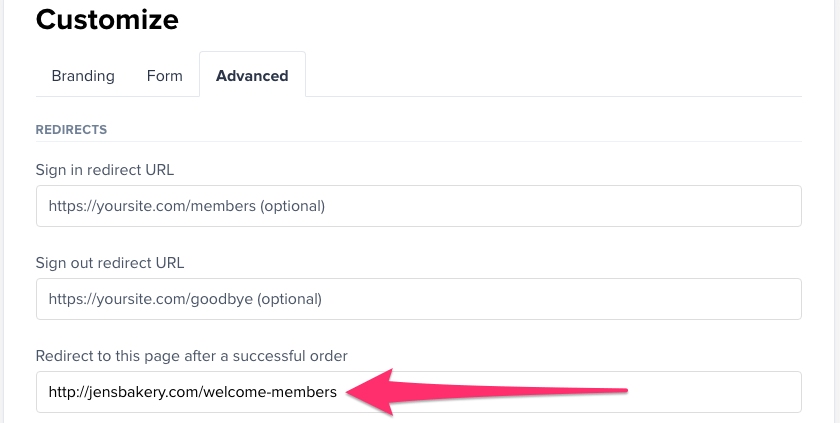
Continue with the setup option that best suits your needs.
Option 1: Memberful with WordPress
- Install the Tapfiliate plugin.
- In WordPress, go to Settings > Tapfiliate.
- Fill in your Tapfiliate account ID. You can find it in your Tapfiliate Profile Settings.
- Save your changes.
- Add the following shortcode to your thank-you page:
Option 2: Memberful without WordPress
1. Place this code in the<head> of every page of your website:
<head> tag of your thank-you page:
3. Save and test your integration.
How to enable recurring commissions?
If you wish to track recurring commissions, remember to connect your Tapfiliate account to Stripe after completing the integration process. Tapfiliate and Memberful integrate seamlessly with Stripe, allowing for the automation of specific tasks, including:- Issuing Recurring Commissions for continuous membership payments
- Tracking Refunds effectively
- Managing Disputes with ease
- Navigate to your Integrations Page.
- Locate Memberful among your integrations and click on it > Connect.