November 9, 2026
- Overview
- What are Tier-Based Commissions?
- Setting up Affiliate Groups
- Assigning Different Commission Rates
- Creating Webhook Triggers for Tier Automation
- Using Tapfiliate’s API to Update Affiliate Groups
- Testing the Automation
- Managing Affiliate Tiers
- Summary
Overview
Tapfiliate allows you to automate the process of rewarding high-performing affiliates by assigning them to higher commission tiers based on their performance.By combining Affiliate Groups, Trigger Webhooks, and the Tapfiliate REST API, you can automatically move affiliates into higher-paying groups once they reach a specific conversion milestone.
This setup helps you:
- Reward affiliates as soon as they hit conversion milestones
- Reduce manual group management
- Ensure fair and automatic commission scaling
- Maintain consistent tracking and reporting inside Tapfiliate
What are Tier-Based Commissions?
Tier-based commissions are a way to offer progressive incentives to affiliates. Affiliates start in a standard commission group and can move up to higher tiers (with higher commission percentages) when they meet specific performance targets, such as reaching a set number of conversions.For example:
As affiliates generate more conversions, Tapfiliate can automatically move them to a higher tier.
Setting up Affiliate Groups
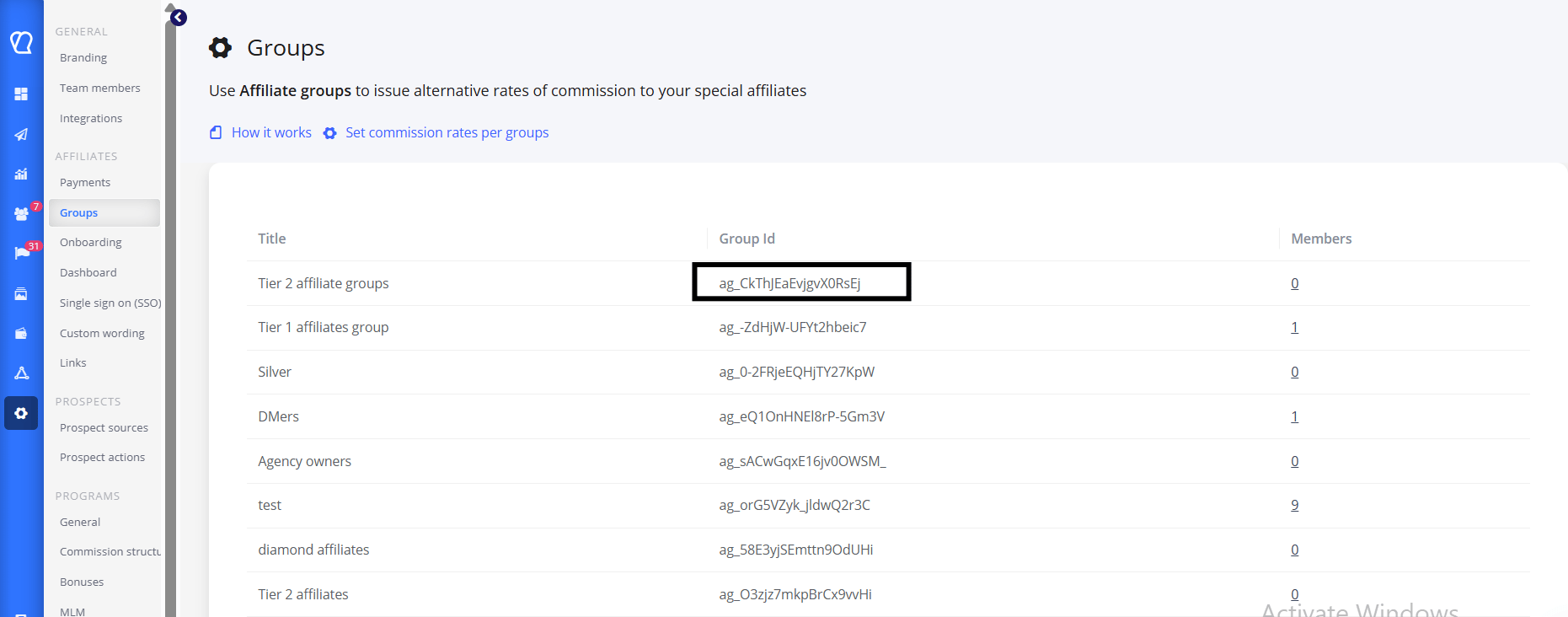
To automate tier promotions, you first need to create Affiliate Groups in Tapfiliate.To do this:
- Navigate to Settings → Affiliate Groups in your Tapfiliate dashboard.
- Click “Create Affiliate Group”.
- Add groups such as Tier 1 and Tier 2.
Assigning Different Commission Rates
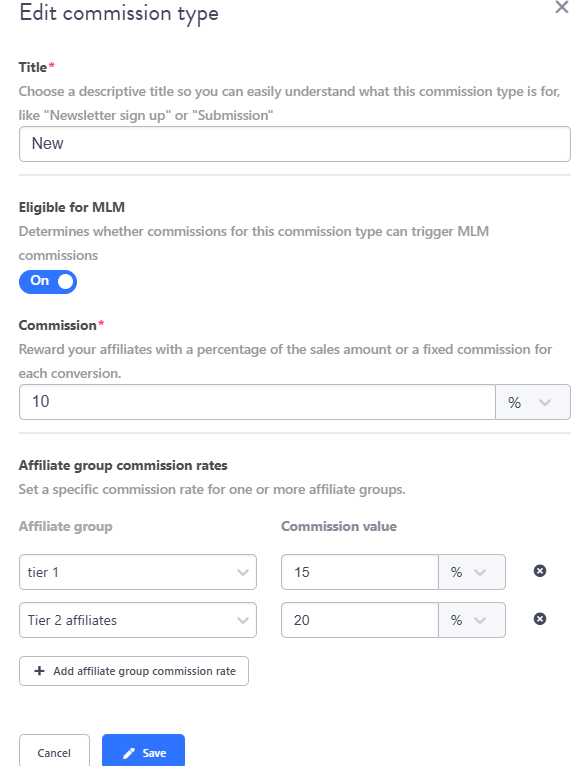
Next, assign a unique commission rate to each group.- Go to Settings → Commission Structure.
- Select your program or campaign.
- Under Affiliate group commission rates, assign rates like:
- Standard: 10%
- Tier 1: 15%
- Tier 2: 20%
- Save your settings.
Creating Webhook Triggers for Tier Automation
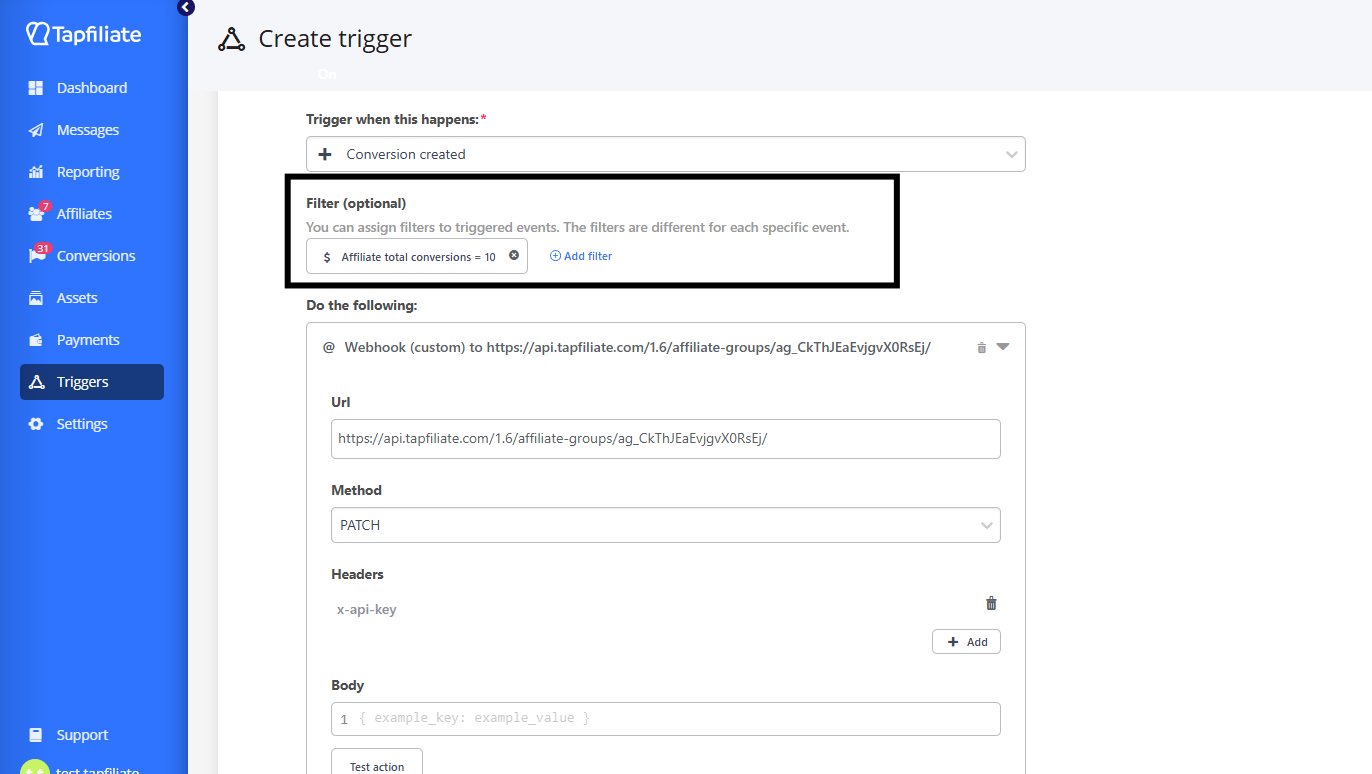
The next step is to set up a custom webhook trigger to detect when an affiliate reaches a performance milestone (e.g., 10 conversions).To set up the webhook trigger:
- Go to Triggers in your Tapfiliate dashboard.
- Click “New trigger” and choose the event “Conversion Created”.
- Add a Filter:
- Filter: Affiliate total conversions
- Operator: = (equal to)
- Value: e.g., 10
- Choose the action: Webhook (or Webhook (custom) if you want to set your own headers and request body).
- Enter the URL of your automation endpoint (this could be your own backend or a webhook handler service).
Using Tapfiliate’s API to Update Affiliate Groups
Your webhook endpoint should call the Tapfiliate REST API to move the affiliate to the next group.You can use the API endpoint:
Tapfiliate API - Set affiliate group (
PUT /affiliates/{affiliate_id}/group/)
You can create additional webhook triggers (for example, at 50 conversions) to move affiliates from Tier 1 → Tier 2 automatically.
Testing the Automation
To ensure your automation works correctly:- Use Tapfiliate’s test conversion feature or create a test affiliate.
- Manually fire test conversions until the affiliate reaches your milestone (e.g., 10 total conversions).
- Check whether:
- The webhook fired successfully
- Your endpoint called the API correctly
- The affiliate’s group was updated to the next tier
Managing Affiliate Tiers
You can manage affiliates and their tiers directly in the Affiliates section.From here, you can:
- Edit: Manually move an affiliate to another group if needed.
- Monitor: View which affiliates are in which groups and how they’re progressing through tiers.
- Group changes affect future conversions only.
- Previous conversions retain the commission rate of the group at the time they occurred.
Summary
By using Tapfiliate’s Trigger Webhooks and REST API, you can automate your tier-based commission system. This ensures your affiliates are instantly rewarded when they hit milestones, without any manual updates.Your automation flow should look like this:
- Create groups (Standard → Tier 1 → Tier 2)
- Assign different commission rates to each group
- Create trigger webhooks for conversion milestones
- Use the Tapfiliate API to move affiliates automatically
You can reach out to our team at support@tapfiliate.com for any further queries.