November 10, 2026
Setting up performance-based bonuses is a powerful way to incentivize your affiliate partners, drive specific actions, and significantly boost your business’s overall sales and conversion rates. This guide walks you through the benefits, setup process, and management of affiliate bonuses.
🎯 What You Will Learn in This Guide
- The strategic benefits of using bonuses to motivate affiliates.
- The different types of bonuses you can offer.
- Step-by-step instructions on setting up a new bonus structure.
- Where to manage and approve earned bonuses.
- Answers to common FAQs about bonus generation.
Statistic Insight: Programs that implement well-structured performance bonuses often report a measurable increase in affiliate activity and revenue generated through the channel, as affiliates are incentivized to achieve the next tier of reward.
You can configure bonuses based on various goals and reward them with either a fixed amount or a percentage of the sales the affiliate generated:
⭐️ Feature Availability
The Bonuses feature is typically reserved for advanced plans.Note: This feature is part of the Scale and Enterprise plans. To access it, upgrade your subscription from Billing > Change plan (see Changing Your Subscription Plan). The setup process is quick and lets you define the exact goals and rewards for your affiliates.
Step 1: Navigate to the Bonus Section
- Go to Programs.
- Click on the Bonuses tab.
- Select your specific Program (If you have more than 1 program).
- Click the + Add bonus button to open the configuration window.
Step 2: Define the Basic Information
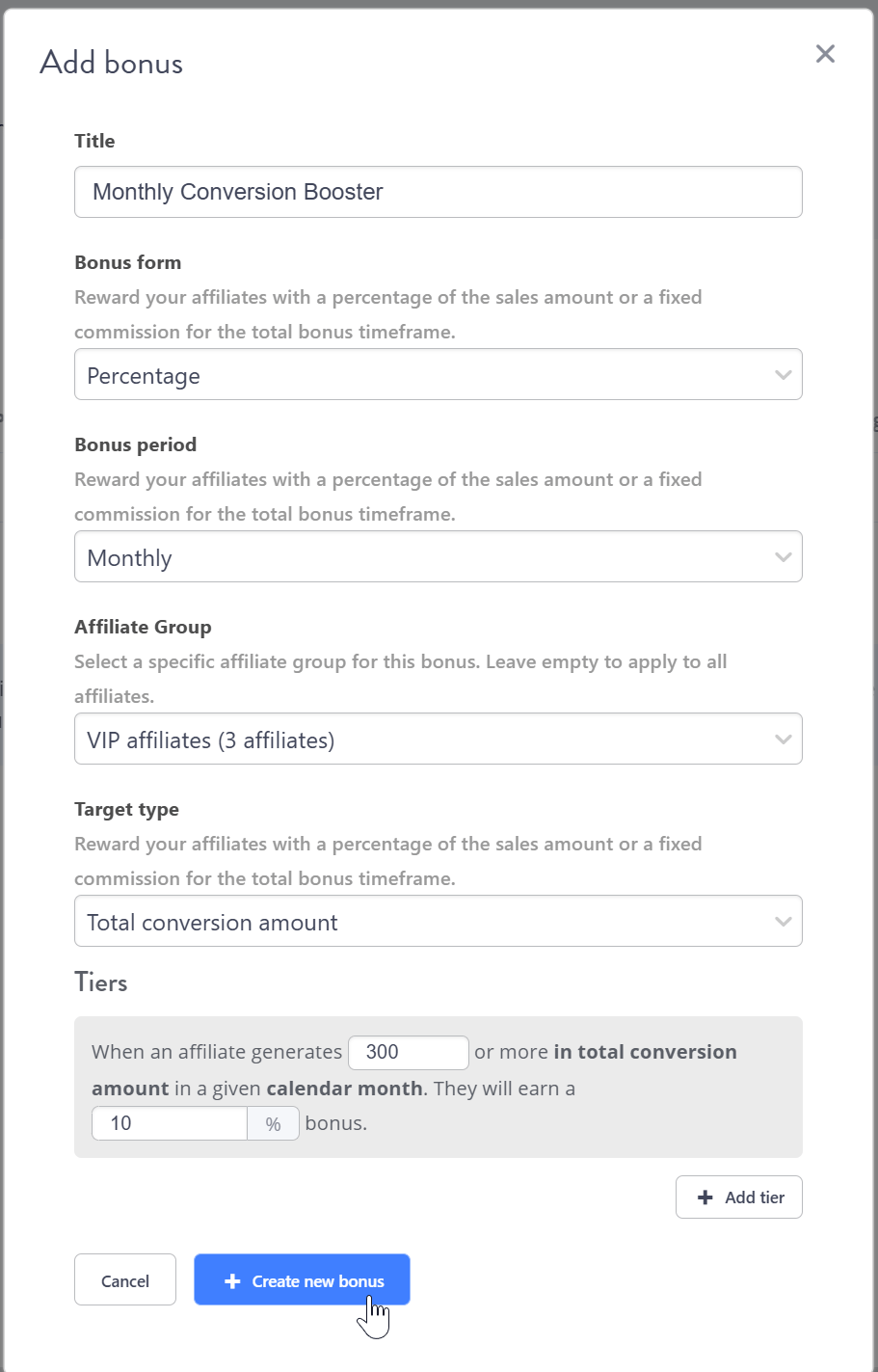
In the “Add bonus” pop-up window, fill out the basic information:- Title: Give your bonus a descriptive name (e.g., “Monthly Conversion Booster”).
- Bonus form: Select the type of reward:
- Fixed: The affiliate earns a set dollar/currency amount.
- Percentage: The affiliate earns a percentage of the sales amount they generated in the period (conversions with an approved commission). It is calculated from sales, not from commissions: a 10% bonus on $5,000 of sales is $500.
- Bonus period: Select the interval for the goal to be achieved:
- Monthly (resets at the start of each calendar month).
- Weekly (resets at the start of each calendar week).
- Note: Other plans may offer custom date ranges.
- Affiliate Group: Select a specific affiliate group to apply the bonus to, or leave it as All affiliates to apply universally.
- Target type: Select the goal metric for your affiliates:
- Total conversion amount: The total monetary value of all conversions.
- Number of conversions: The count of successful conversions (sales/leads).
Step 3: Build the Tiers (Bonuses)
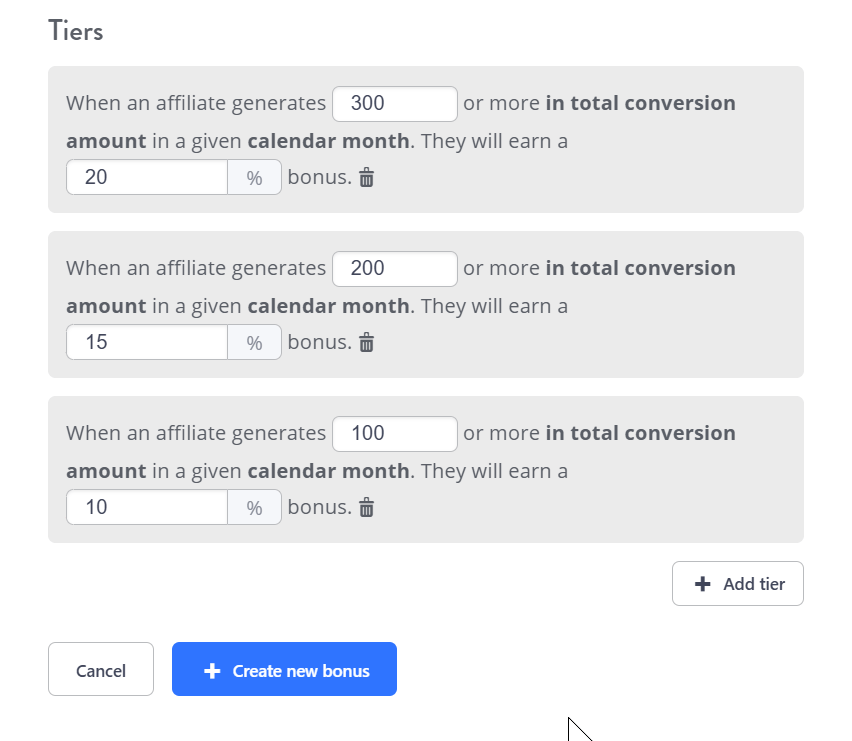
The Tiers section allows you to define thresholds for earning an additional bonus based on the influencer’s performance.- Click + Add tier.
- Set the goal: You define the amount needed, for example: “When an affiliate generates [300] or more in total conversion amount in a given calendar month.”
- Set the reward: You define the bonus percentage corresponding to that goal, for example: “They will earn a [15] % bonus.”
1. Tracking Bonus Periods
-
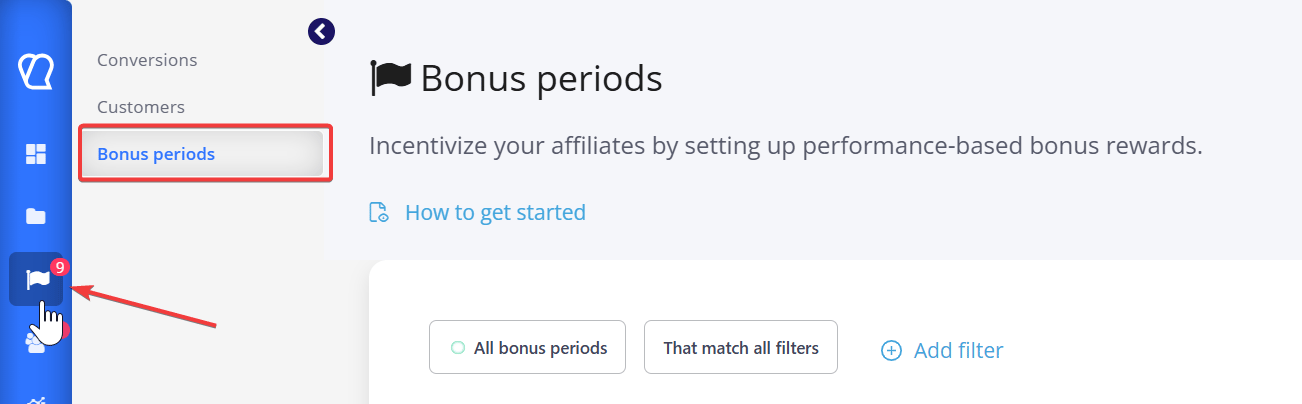
Navigate to Conversions and click on Bonus periods in the sidebar.
-
This view shows all bonus periods and their current Status (e.g., Pending or Closed.
2. The Generation Requirement
- Bonus commissions will only be generated and attributed to the affiliate after the bonus period is over, and all commissions within that period have been reviewed (approved or disapproved).
- When you view a bonus period, a message indicates that commissions will be generated once all commissions are reviewed. Commissions that are pending approval will not be counted towards the bonus goal.
3. Reviewing Unreviewed Commissions
- If a bonus period has unreviewed commissions (e.g., “There are 1 unreviewed commissions in this bonus period”), you must review them first.
- Clicking on the unreviewed commission link often takes you to the Conversions & Commissions tab.
- Here, you can review, approve, or disapprove the pending conversions to finalize the data for that period.
4. Approving the Bonus Commission
- Once all base commissions are reviewed, a separate Bonus commission is created if the goal was met.
- When viewing the specific bonus period, the Bonus commission will appear, and you can review it (e.g., “+100.00 EUR” for affiliate “Rachel Green”).
- You must then click Approve all pending commissions or approve/disapprove the bonus commission individually.
Still need help?
If you have any questions or if something in this guide is unclear, please don’t hesitate to contact us at support@tapfiliate.com-we’re happy to assist!
FAQ
❓Are bonuses based on commissions?
No. Bonuses are separate, performance-based rewards tied to reaching a goal (like a conversion count or amount). A “Percentage” bonus is calculated from the affiliate’s sales amount for the period, not from their commissions.❓What happens if I approve a commission that occurred during the bonus period?
If you approve or disapprove a commission that falls within a past bonus period, the system will regenerate the bonuses to account for the change. Bonus regenerations typically happen hourly to ensure accuracy.❓Can I set up a bonus that increases with each tier?
Yes, but remember they are not cumulative. If an affiliate qualifies for Tier 2 ($100 bonus) and Tier 1 ($50 bonus), they will only receive the reward for Tier 2 ($100), as it is the highest tier reached.❓Can affiliates see their bonuses in the affiliate portal?
Yes. Affiliates can go to the Programs section and click on the Bonuses tab to see their active bonuses and track the conditions they need to fulfill.➡️ Next Steps: Related Articles
- How to Approve, Disapprove or Modify Conversions
- Setting Up Multi-Level Marketing (MLM) Structures
- How to Use Affiliate Groups