October 21, 2026
- Why Use Multiple Currencies?
- Plan Availability & Limits
- How to Set Up a Multi-Currency Program
- Retiring a Regional Program
- Supported Currencies by Continent
- FAQ
- Next Steps
As your business grows globally, you may need to offer different commission structures based on the region or specific product line. Since one affiliate program can only have one base currency, advertisers often create separate programs to cater to different markets.
Example Scenario: A streaming service like “Lekkerflix” operates in South Africa and the UK. Under one Tapfiliate account, they can manage:
- Program A: “Lekkerflix SA” – Set to ZAR for local South African affiliates.
- Program B: “Lekkerflix UK” – Set to GBP for UK-based partners.
Your ability to create multiple programs (and thus use multiple program currencies) depends on your Tapfiliate plan:
Only active programs count towards this limit. A program you have archived does not, so a market you no longer sell in does not take up a slot on your plan.
To set up a program with a specific currency, follow these steps:
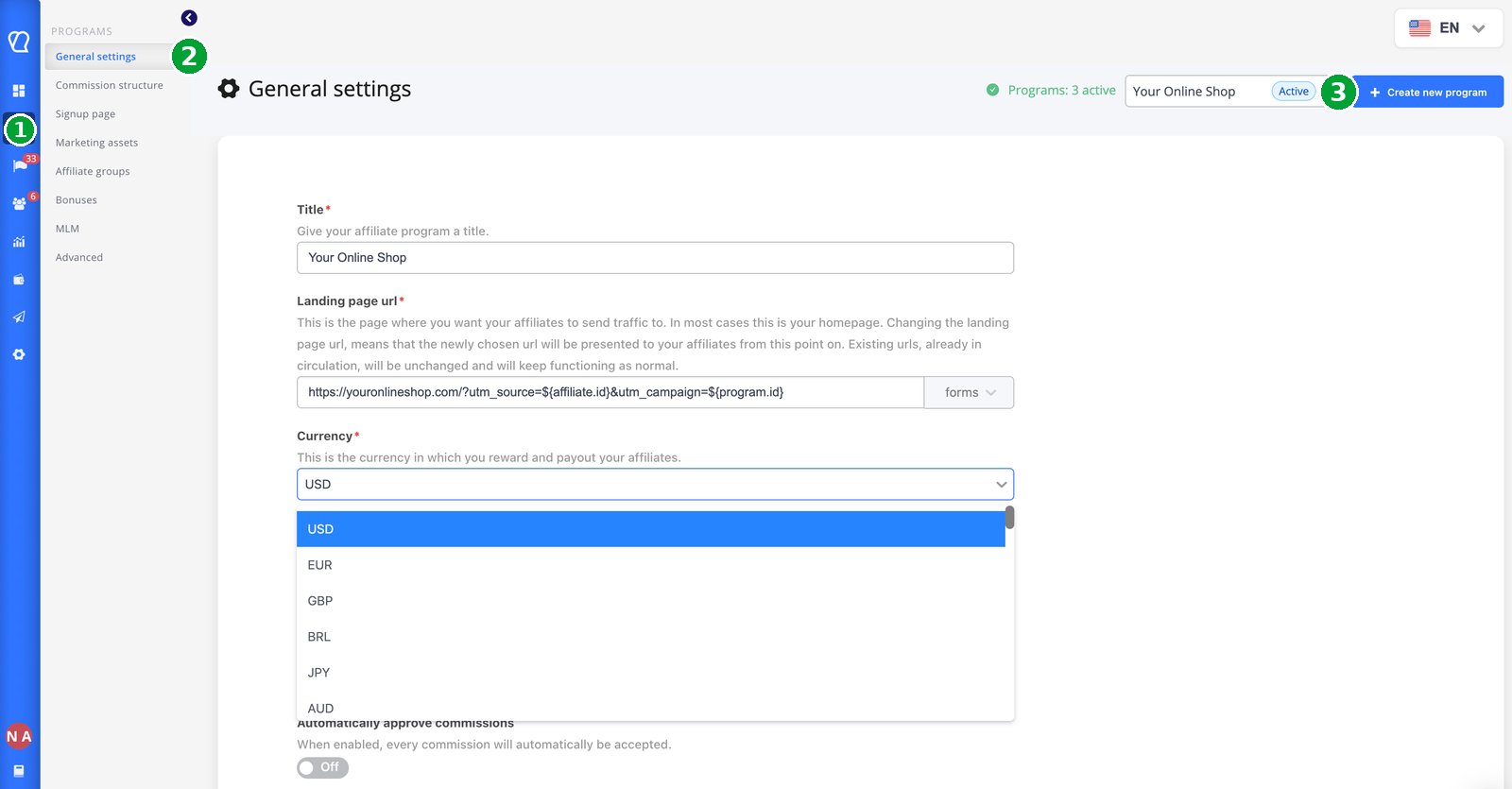
- Open Programs: From your Tapfiliate Dashboard, click on Programs in the left-hand menu.
- Go to General settings: Select General settings.
- Create New Program: Click the + Create new program button located in the top-right corner.
- Configure Currency: In the setup window, locate the Currency field.
- Save: Select your desired currency from the dropdown (e.g., ZAR, USD, EUR) and fill in the remaining program details before clicking Save.
- Go to Programs > General settings.
- Select the program in the switcher in the top right corner of the page.
- Scroll to the bottom of the page and click Archive program, then confirm.
If you return to the market later, open the archived program and click Activate. Its currency and settings come back exactly as they were. The full walkthrough is in General Program Settings. Tapfiliate supports a wide range of global currencies. Below is a logical breakdown to help you find yours quickly:
FAQ
❓Can Tapfiliate automatically exchange currencies?
Yes. If your account contains data in multiple currencies, Tapfiliate automatically converts values to your configured Account Currency for reporting, allowing you to view your performance in a single reporting currency.However, this does not change the Program Currency or the original currency of tracked conversions. Commissions continue to be calculated and stored based on the configured Program Currency for each affiliate program.
❓How can I view reports if I have programs with different currencies?
If you’re looking to change the currency used in reporting, see How to Set Up the Account Currency. To view reporting for a specific program, go to Reporting, click + Add filter, select Program, and choose the program you wish to analyze. The report will display data only for that program, while amounts are shown in the currently selected reporting currency.❓Can I change the currency when adding a manual conversion?
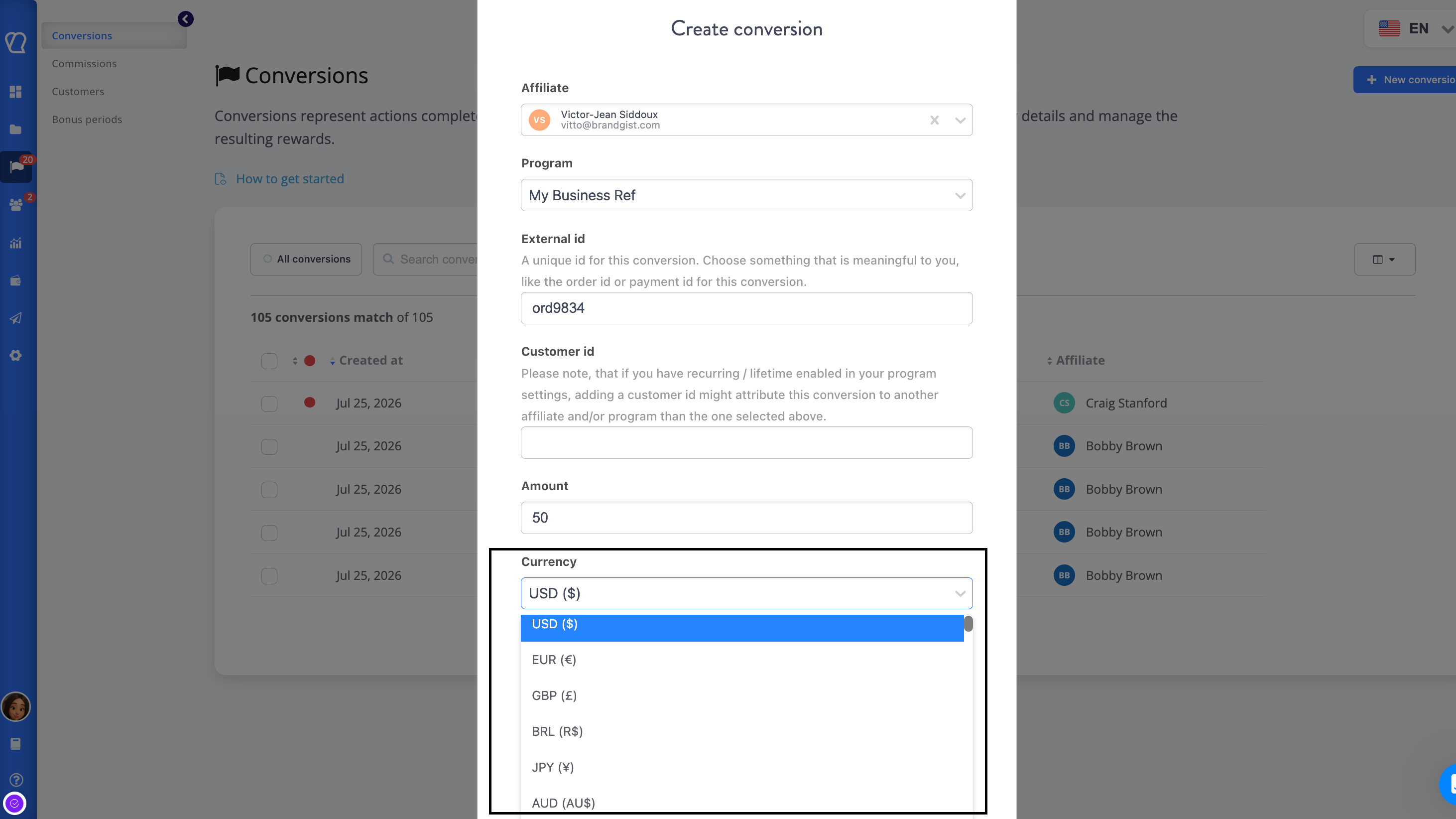
Yes. When adding a manual conversion through the Tapfiliate interface, you can select the currency directly from the Currency drop-down.If you’re creating conversions through the REST API, you can also specify the currency by passing the appropriate ISO currency code.
❓ If I use the API, can I use any currency code?
Yes, you can pass any supported ISO code. However, for reporting, the commission will still be calculated based on the base currency of that specific program.❓Can I pay my affiliates in Crypto (BTC/ETH)?
Yes. You can track commissions in crypto currencies. Since payouts are performed outside of Tapfiliate, you simply record the payment in the platform after sending the crypto from your wallet.Still need help?
If you have any questions or if something in this guide is unclear or If you want to unlock this feature and collect more details about your affiliates, please don’t hesitate to contact us at support@tapfiliate.com-we’re happy to assist!
Next Steps
Now that you understand multi-currency setups, you might find these guides helpful:- How to Set Up the Account Currency. – Learn how to set up currency for your account.
- How to Use Affiliate Groups – Segment your affiliates within a single program for better management.
- How to Create a New Program – This article explains how to efficiently set up a few affiliate programs under a single Tapfiliate account to manage multiple products or target different markets.
- REST API Documentation – Detailed technical info for overriding default currencies.