July 20, 2026
1. Understanding Commission Types: Standard vs. Recurring2. How to Set Up Standard Commissions (The Default)
3. Setting Up Recurring Commissions (For Subscriptions)
4. Advanced Commissions: Why Configuration Matters
5. FAQ
6. Next Steps
Standard vs. Recurring Commissions
When setting up your program, you will choose between two primary types of commissions: Standard and Recurring.
Need More Detail? Before setting your rate, understand which actions are payable and how to accurately calculate the reward amount.
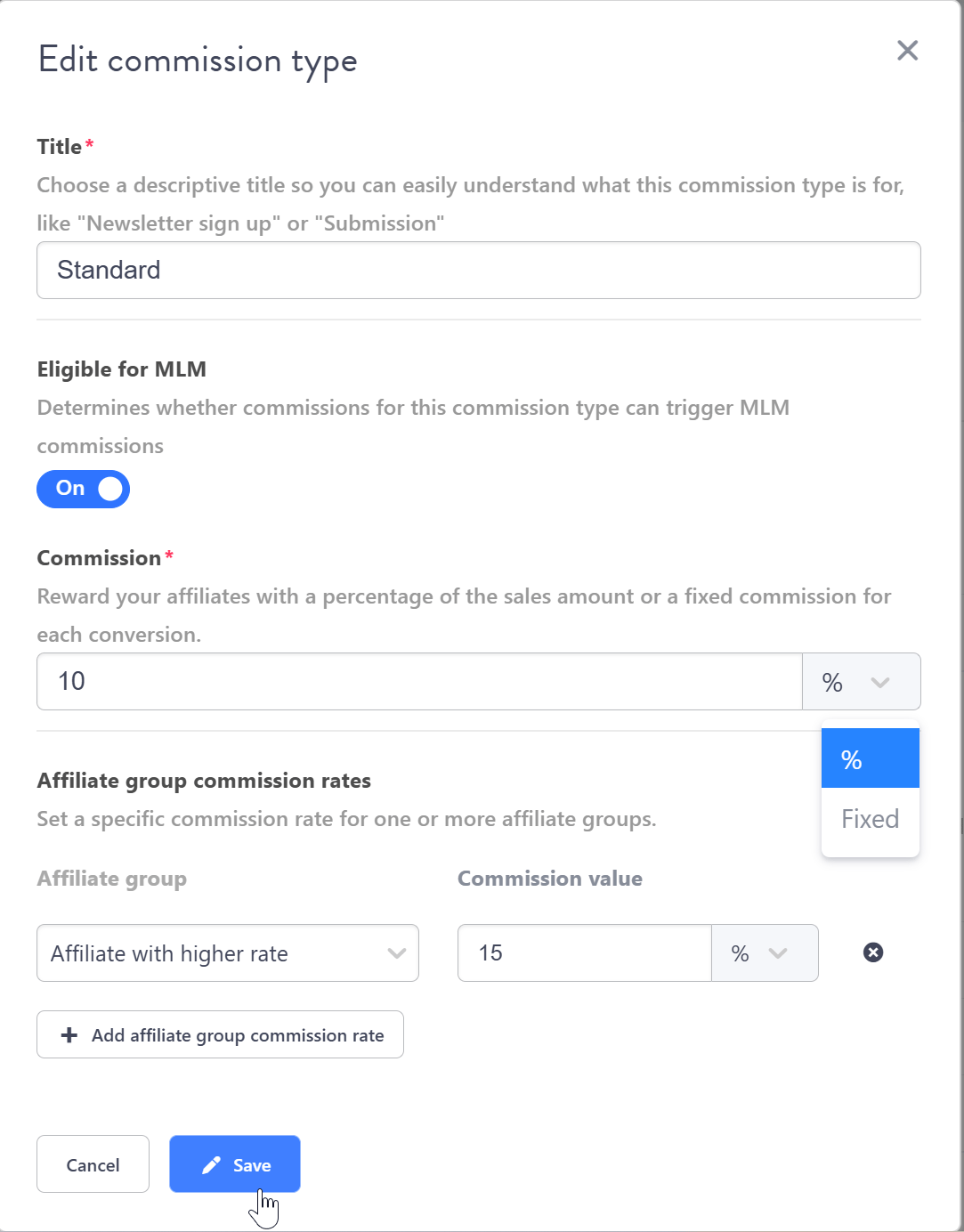
For a detailed step-by-step guide on financial calculations read The Ultimate Checklist to Launch your Program like a pro.pdf (Section 2: Calculating Affiliate Commissions), go directly to Page 18. The Standard commission is the default rule applied to all conversions unless overridden by a more specific rule (like an Affiliate Group or Recurring setting). By default, the system sets this value to 10%. Standard commissions are simple and flexible. They can be set as a fixed amount or as a percentage of the sale revenue.

Step-by-Step Configuration
1 Define the Title: In the Title field, choose a descriptive name for this commission type (e.g., “Standard Sale” or “Monthly Subscription Payout”).- Important Note: The name “Standard” is an internal label. Because affiliates see the name of the commission they earn, you should immediately rename this internal label to something descriptive like “Standard Sale” or “Newsletter Sign-up”.
- Percentage of the sale revenue.
- Fixed amount for a specific conversion.
👉 Learn More: For a detailed setup guide, please refer to our dedicated article: Setting up Recurring Commissions.
Setting the commission is not just filling a field; it’s a strategic decision. Experience shows that advertisers who correctly utilize segmentation and tiered rewards see better results:
- The Secret to Success: Advertisers who actively use features like Affiliate Groups and Extra Commissions often see their top 10% of affiliates earning 30–50% more than affiliates in programs with standard, unchanging rates. This occurs because clearly defined commissions and bonuses motivate affiliates to work harder, knowing their efforts will be fairly rewarded.
- Extra Commissions: Apply special rates to specific products, product categories, or customer types within your program - Learn how to set up Extra Commissions here.
- Bonus System: Reward affiliates with one-time cash payouts for reaching sales milestones - Learn how to set up Bonuses here.
- Affiliate Groups: Set up unique, higher commission structures for your top-performing partners - Learn how to use Affiliate Groups.
FAQ
❓Why is the default rate 10%?
The default rate is simply a placeholder set by the system. You must change it to a rate that fits your product’s profitability (often 1–50% depending on your industry).❓Should I pay a percentage or a fixed amount?
Percentage is best for e-commerce with varying order values. A Fixed amount is better for high-ticket services or specific lead generation actions (CPL) where the conversion value is static.❓How does “Standard” differ from my specific commission name?
“Standard” is just the internal rule type. You must rename it (e.g., to “20% Sale Commission”) so your affiliates know exactly what reward they earned when they see it in their portal.❓Do I need to approve every commission manually?
Not necessarily. Tapfiliate offers an option to Automatically approve commissions. However, many companies manually approve them initially to account for refunds and prevent fraud. Still need help?If you have any questions or if something in this guide is unclear, please don’t hesitate to contact us at support@tapfiliate.com-we’re happy to assist!
Next Steps
Once the default and recurring rules are set, you can optimize your rewards structure further using the following advanced features (available on Scale and Enterprise plans):- Extra Commissions: Apply special rates to specific products, product categories, or customer types within your program.
- Bonus System: Reward affiliates with one-time cash payouts for reaching sales milestones.
- Affiliate Groups: Set up unique, higher commission structures for your top-performing partners.
- Continue to the next setup step: How to customize affiliate sign-up?