November 9, 2026
Tapfiliate offers annual billing as a payment option. Find out how you can pay for a yearly subscription for new users or how to upgrade your current monthly plan to an annual one.In this article, we’ll cover:
- 🔄 How to switch between monthly and annual payments
- ❓ What happens after the first year of annual billing
- 💸How refunds get handled within annual billing
If you don’t have a Tapfiliate account yet, you’ll be able to select either monthly or annual billing right at signing up. The option to choose a plan and/or switch from monthly to annual billing will appear on the signup page.
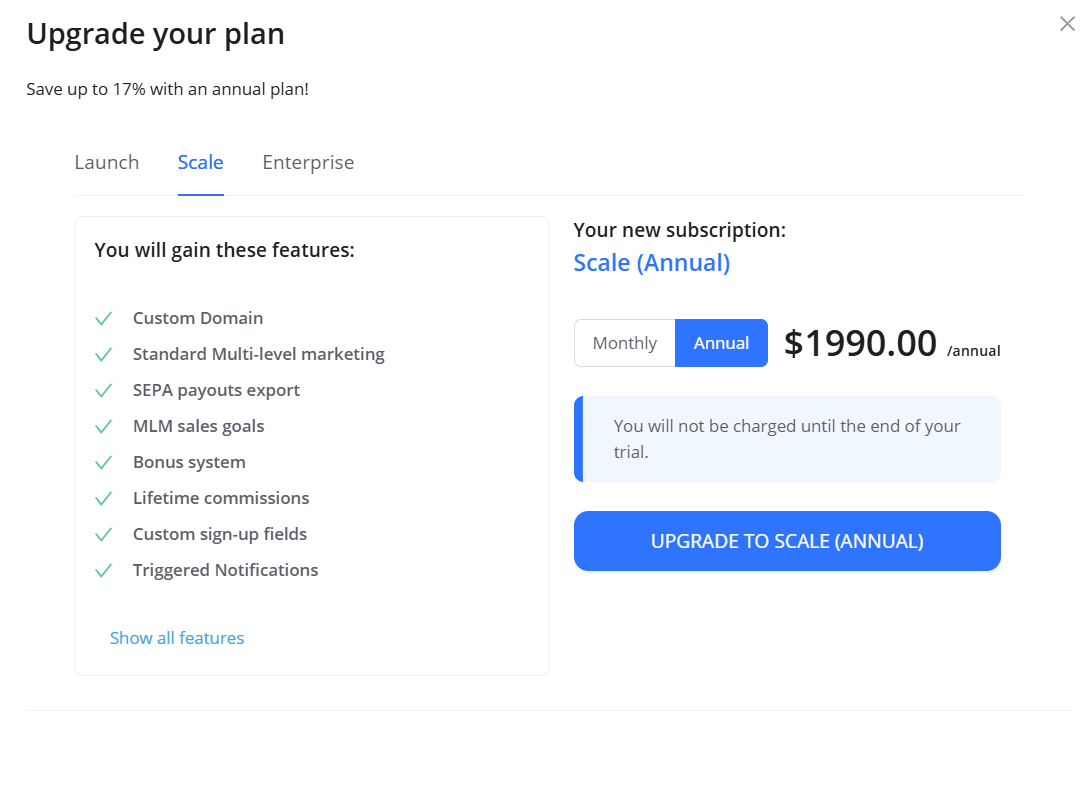
Still in your trial?
During your trial you can switch between monthly and annual billing, and between plans, yourself in Settings → Account → Billing → Change plan. You will get charged when your trial time ends, and thus the billing cycle starts.
Important note: downgrading an annual plan or switching back to monthly billing is only possible via a support request.
When you switch from monthly billing to an annual plan of a higher tier (for example, from Launch monthly to Scale annual), and also when you upgrade from one annual plan to another, the following will apply:
- Your current billing will stop
- The new billing period will start on the day of the switch and last for the next 12 months
- You will get charged within 24 hours from the switch/upgrade request
- We will calculate the billing sum as such:
When you switch to the annual version of your current plan (for example, from Launch monthly to Launch annual) or to an annual plan of a lower tier, your plan changes right away, the month you have already paid for runs to its end, and the full annual price is charged on your next billing date. There is no credit for the month you have already paid for: under our Terms of Service, a downgrade gives no right to a refund or credit.
Tapfiliate will issue an auto-charge for the next year once your paid period is over. No worries, we’ll send out a reminder via email in advance ✉️
Annual payments are non-refundable, in whole or in part, including when you cancel or downgrade during the year. If you cancel, you keep access until the end of the year you have paid for.
If we charged you in error, report it to support@tapfiliate.com within 30 days of the charge and we will refund that amount. See Why was I charged and what is the refund policy? for the full policy.