October 15, 2026
In this article, we will discuss:
- Tracking Activity Across Multiple Domains and Subdomains
- Why Some Tracking Scenarios Are Not Supported
- Supported Scenarios and How to Implement Them
- Use Cases: Running Separate Affiliate Programs for Multiple Websites
- If You Need Help
Understanding how your users navigate your websites is essential for accurate affiliate tracking. Before diving into the technical details, let’s clarify some key terms and scenarios:
Key Terms
- Main Domain: Your primary website, e.g., mysite.com.
Subdomain: A part of your main domain, often used for apps, landing pages, or blogs, e.g., app.mysite.com or landing.mysite.com. - Different Domains: Completely separate websites with unique domain names, e.g., mysite.com → myothersite.com.
Different Locales / Top-Level Domains: Versions of your website for different countries or regions, e.g., mysite.com → mysite.es.
Tracking across completely separate domains is not supported—not just in Tapfiliate, but in most affiliate systems. Here’s why:
- Cross-domain tracking limitation: Most affiliate platforms rely on first-party cookies, which only work on the domain where they are set. Cookies cannot be read across different domains for privacy and browser security reasons.
- Top-level domain limitations: Similarly, different top-level domains (TLDs), even if they represent the same brand (e.g., .com vs .es), are treated as entirely separate sites by browsers.
1. Main Domain → Main Domain
Example: mysite.com → mysite.com ✅ Supported out of the box. No extra setup is required.2. Main Domain → Subdomain
Example: mysite.com → app.mysite.com ✅ Supported out of the box. Subdomains are typically part of the same website, so tracking works automatically.3. Subdomain → Different Subdomain
Example: landing.mysite.com → app.mysite.com ✅ Supported, but requires a small modification:- In this case, you must modify your click tracking code so that the cookie is placed in the main domain.
- Modify your click tracking script by adding the cookie_domain setting as documented below:
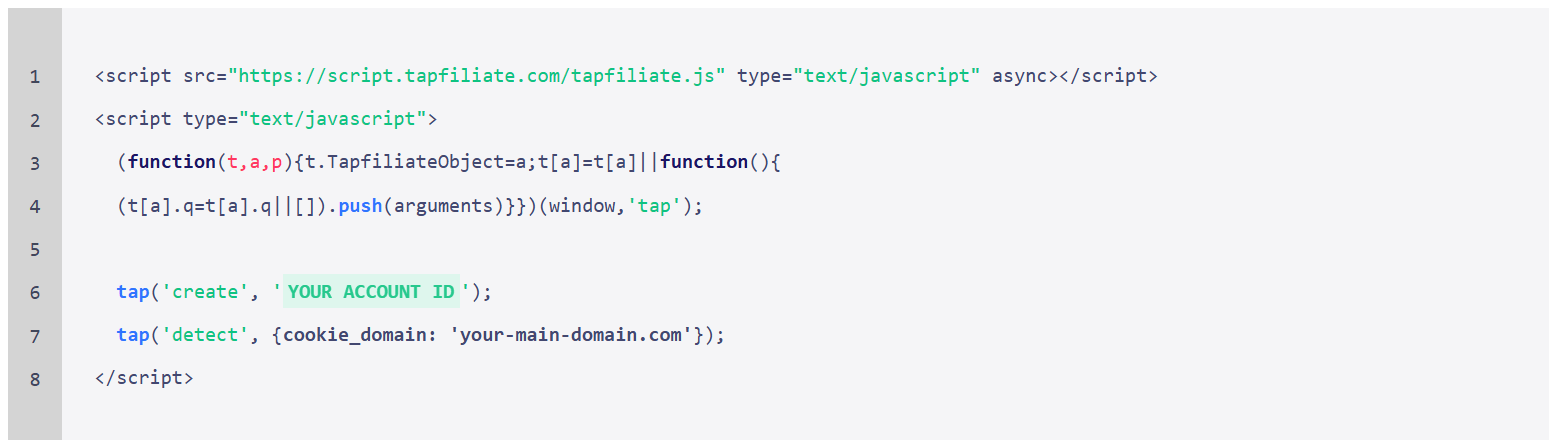
- The cookie domain should be set to the main domain.
Tapfiliate allows you to manage multiple affiliate programs under a single account. Here are some examples of how this can work depending on your setup:
- Multiple websites on the same CMS (e.g., Shopify, WordPress)
- Use JavaScript or REST API integration.
- Create a separate affiliate program for each website within your account. - Multiple websites on different CMS platforms
- Use the ready-made plugins or customizable JS snippets for each CMS.
- Each site can have its own affiliate program while being managed from one account. - Multiple custom-built websites
- Use JavaScript or REST API integration for each site.
- Maintain separate affiliate programs with centralized management.
If you’re not sure which setup fits your websites, we’re here to help.
- You can start by watching our pre-recorded demo to get a clearer understanding of how the platform works.
- And of course, feel free to reach out to our team anytime — we’re always happy to help and review your specific use case together.