October 22, 2026
In this article, we will discuss:
- Step by step guide to set different landing pages for affiliates
- Edit or update landing page settings
- Affiliate experience with custom links
- FAQ
Tapfiliate’s Dynamic Tag System
Tapfiliate allows you to use dynamic tags in your landing page URLs. These tags automatically pull data from the affiliate’s profile, such as their first name, email address, affiliate ID, and custom fields. By using this system, you can create personalized landing page experiences for each affiliate in a single program, without manually configuring separate links.Note: Please keep in mind that each unique landing page must exist as a website page, otherwise the affiliates will face an error if the page does not exist.
How you can set different landing pages for affiliates
1. Access the Program Settings
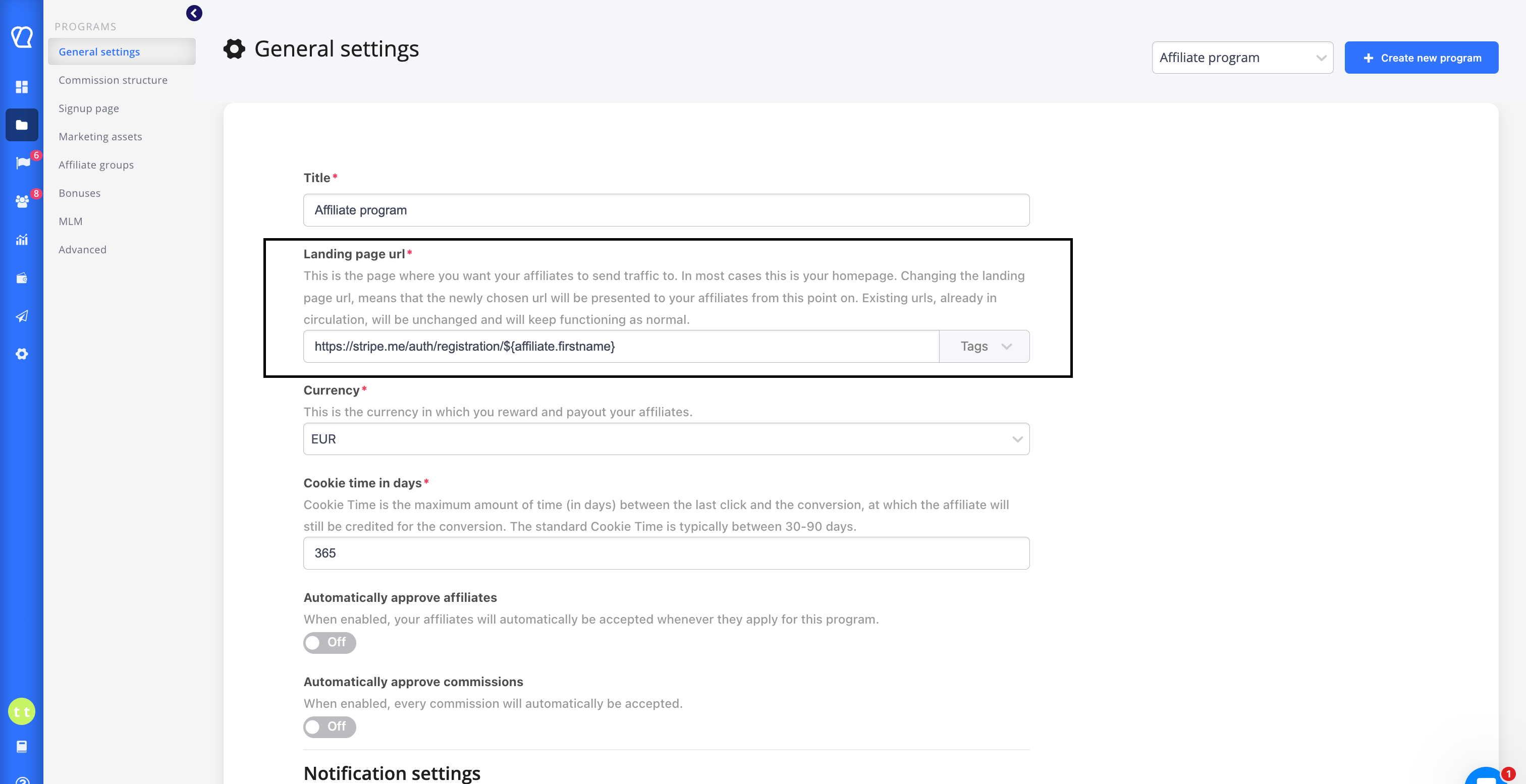
- Log into your Tapfiliate advertiser account.
- Go to “Programs” section, and go to “general settings”
- Select the program where you want to configure dynamic landing pages.
2. Set the Default Landing Page URL
- In the program settings, look for the “Landing Page URL” field.
- This is where you define the base URL structure for all affiliate links in the program.
3. Use Dynamic Tags
- Tapfiliate supports the use of variables using the
${}syntax. - You can include dynamic tags in the URL such as:
${affiliate.firstname}${affiliate.lastname}${affiliate.email}${affiliate.id}${affiliate.meta_data[custom_field]}(for custom data)
4. Save and Apply
- Once you’ve defined your landing page template using tags, click “Save”.
- From this point on, Tapfiliate will automatically generate each affiliate’s referral link using the tags you defined.
Edit or Update Landing Page Settings
To make changes later:- Return to the Programs general settings → Landing Page URL field.
- Edit the tag structure as needed.
- Save the changes — affiliate links will automatically regenerate with the new structure.
Affiliate Experience with Custom Links
From the affiliate’s perspective:- They log into their affiliate dashboard.
- They receive a referral link that includes the custom data you’ve set.
-
Example personalized link:
- When they share it, the landing page feels more tailored, potentially increasing trust and conversion rates.
- Route affiliates to team-specific or location-specific pages.
- Pre-fill sign-up or checkout forms using affiliate data.
FAQ
1. What tags are supported in the landing page URL?You can use the following:
${affiliate.firstname}${affiliate.lastname}${affiliate.email}${affiliate.id}${affiliate.meta_data[custom_key]}(replacecustom_keywith your field)
2. Can I include UTM parameters too?
Yes. You can combine UTM tracking with tags:
If a tag (like
${affiliate.meta_data[nickname]}) is undefined for an affiliate, it will render as a blank string in the final URL. You should ensure that required fields are populated in affiliate profiles.
4. Will this affect tracking?No. As long as the
ref (or equivalent tracking parameter) is present in the URL, conversions will be tracked normally.