July 20, 2026
Want to have links that direct to a specific page on or product on your website? We’ve made it possible for:
- You (the Advertiser) to create these links for your affiliates.
- Your affiliates to create deep links on their own.
You, the Advertiser, want to create deep links for your affiliates to use
Whether you’re running a special promotion or you’d like to drive traffic to specific products on your website, the ability to create additional links for your affiliates always comes in handy! You can offer your affiliates the possibility to link to specific products, landing pages, offer pages, or other parts of your website than your default landing page URL.- To do this, proceed as though you were creating a marketing asset.
- On your dashboard, click on the ‘Assets’ tab > Click on ‘New’ > Select from the drop-down menu the type of asset that will be used to deep link > Fill out other required fields for the asset > Hit ‘Create Asset’;
- The newly created links/assets will be automatically shared with your affiliates.
You, the Affiliate, would like to create your own deep-links
First of all, affiliates can use our deeplinking tool located in their affiliate portal under the respective section: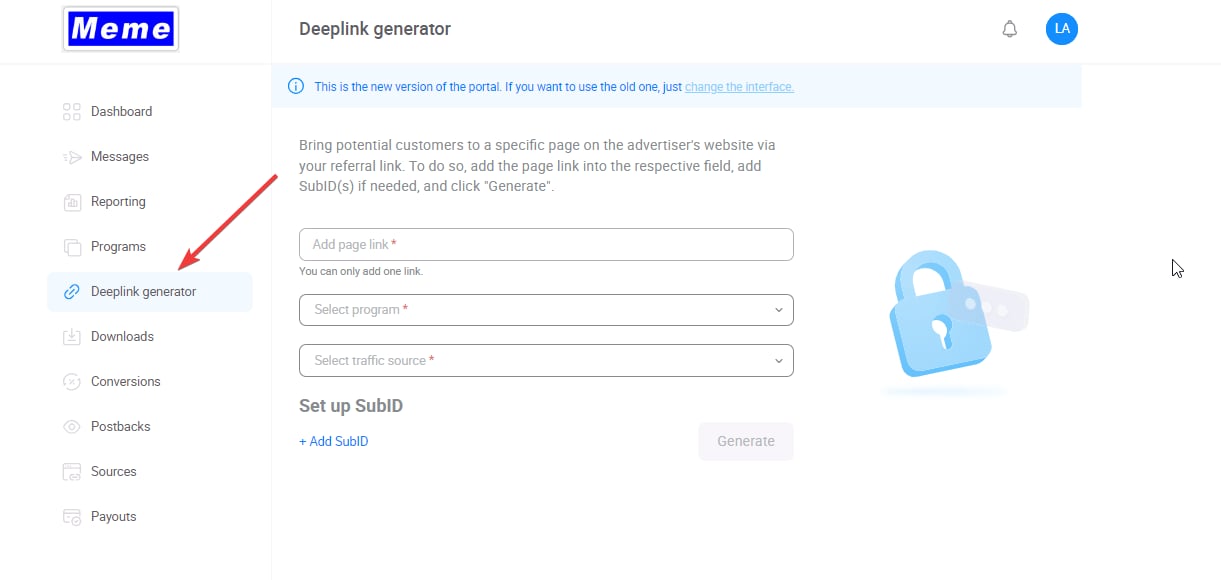
- Page link: specify the link on advertiser’s website they want to redirect users to
- Program: if affiliate is a part of multiple programs in the same advertiser account, they can choose a program for deep-linking in this drop-down menu
- Traffic source: in case affiliate has multiple sources to distribute the traffic to a program, a specific source can be chosen in this drop-down menu
- Make sure the URL aligns with the program URL. If the program URL does not have ‘www’ at the beginning, it shouldn’t be included in the ‘Page link’ field as well. Once the fields are filled, they have to click the Generate button. A ready-made link will appear in the window below:
-
Query & Hash: If your affiliate’s link appears as follows;
https://your-site.com/?ref=nlmjdis29you can place the referral code part (?ref=nlmjdis29 OR ?a=123-abc&s=bcd-321) behind any link of the Advertiser’s site to make it trackable:https://your-site.com/product-x?ref=nlmjdis29 -
Redirect: When using redirect tracking, your affiliate link will look roughly as follows: https://frstre.com/?a=123-abc&s=bcd-321 .
In this case, affiliates can append &d=LINK-TO-SPECIFIC-PAGE to their affiliate link, like so https://frstre.com/?a=123-abc&s=bcd-321&d=https://your-site.com/product-x